How To Find Your Cuisinart Coffee Maker Model Number
Finding your Cuisinart coffee maker model number is easier than you think. You can locate it on the bottom of the machine, the back panel, or even the water reservoir. This guide walks you through every spot to check, what to do if the label is worn off, and why your model number matters for repairs, parts, and warranty claims.
There is nothing more frustrating than trying to find a replacement part for your Cuisinart coffee maker and realizing you do not know the model number. Maybe the label wore off. Maybe you moved the machine years ago and tossed the box. Whatever the reason, you are not alone. Thousands of people search for their Cuisinart coffee maker model number every single month.
The good news is that finding it is usually quick and straightforward. Cuisinart places model numbers in several predictable spots on their machines. Once you know where to look, you will have it in just a few minutes. This guide shows you exactly where to check, what to do if the label is gone, and why this small string of letters and numbers matters so much.
Whether you own a Cuisinart drip coffee maker, a single serve machine, or a fancy espresso model, this article covers it all. We also share tips on keeping your model number safe for the future. Let us get started.
Key Takeaways
- Check the bottom and back of the machine first — this is where most Cuisinart model numbers are printed or etched.
- Look at the water reservoir, base plate, and original packaging if the main label is missing or faded.
- Your model number is essential for finding replacement parts, claiming warranty service, and troubleshooting issues.
- Use the Cuisinart website or customer support to look up your machine using other details like serial number or product photo.
- Keep your model number stored digitally so you always have it handy for future reference.
- Different Cuisinart coffee maker types (drip, single serve, espresso) have slightly different label locations.
- Cleaning and maintaining your machine regularly helps keep the model label readable over time.
📑 Table of Contents
- Why Finding Your Cuisinart Coffee Maker Model Number Matters
- Where To Look For Your Cuisinart Coffee Maker Model Number
- How To Identify Your Cuisinart Coffee Maker Type
- What To Do If You Cannot Find The Model Number
- Why Your Model Number Is Important For Repairs And Parts
- Tips For Keeping Your Model Number Handy
- Common Mistakes People Make When Looking For Their Model Number
- Conclusion
Why Finding Your Cuisinart Coffee Maker Model Number Matters
Your coffee maker model number is more than just a random code on a sticker. It is the key to unlocking important information about your machine. Without it, you are basically guessing when it comes to repairs, parts, and support.
Here are the main reasons you need this number:
- Finding the right replacement parts. Filters, carafes, water reservoirs, and heating elements are all model-specific. Using the wrong part can damage your machine or void your warranty.
- Claiming warranty service. Cuisinart requires your model number to process any warranty claim. If you cannot provide it, the process slows down significantly.
- Getting accurate troubleshooting help. Customer support agents need to know your exact model to give you the right advice. A general tip for one model may not apply to another.
- Checking product recalls and safety notices. Cuisinart sometimes issues recalls for specific models. Your model number tells you if your machine is affected.
- Registering your product. If you have not yet registered your coffee maker, the model number is required to complete the registration.
Think of your model number as the DNA of your coffee maker. It tells you exactly what you have, what works with it, and how to take care of it properly.
Where To Look For Your Cuisinart Coffee Maker Model Number
The model number on a Cuisinart coffee machine can appear in several places depending on the type and age of the machine. Here are the most common spots to check.
On The Bottom Or Back Of The Machine
Start here. Most Cuisinart coffee makers have the model number printed or etched on the bottom of the base or on the back panel near the power cord. Flip the machine over carefully and look for a silver or white sticker or a raised engraving.
The label usually includes both the model number and the serial number. They are often printed close together, so make sure you do not confuse the two. The model number typically starts with letters like “CP” or “CH” followed by numbers, such as CP-1215 or CH-180.
Use a flashlight if the bottom is dark. Some older models have the label on the underside of the water reservoir or near the back hinge area. Shine a light around the entire base and back panel to be thorough.
On The Water Reservoir Or Base Plate
For many Cuisinart drip coffee makers, the model number is printed directly on the water reservoir or the base plate inside the machine. Remove the reservoir by lifting it off its hinges and check the underside or the side that faces the machine.
Some models also have the information stamped right into the plastic of the base. Run your fingers along the inside of the base to feel for any raised letters or numbers. This is especially common on machines made in the last decade.
On The Original Packaging Or Receipt
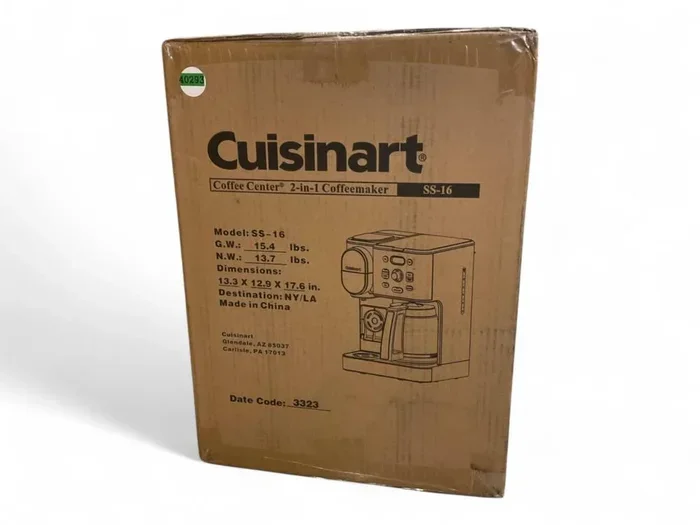
If the label on your machine is worn off or peeling, check the original box or packaging. The model number is printed on a sticker on the outside of the box, usually near the bar code. If you still have the receipt or order confirmation email, the model number is often listed there too.
For those who bought their machine years ago and tossed the box, do not worry. There are still other ways to find the number, which we will cover next.
On The Product Registration Card Or Manual
If you kept the user manual that came with your Cuisinart coffee maker, the model number is on the cover page or in the first few pages. Even if you threw the manual away, you can often find a PDF version on the Cuisinart website by searching for the product name.
Some Cuisinart machines also include a product registration card in the box. If you filled it out and mailed it in, Cuisinart has your model number on file. You can contact them to retrieve it.
How To Identify Your Cuisinart Coffee Maker Type
Cuisinart makes several different types of coffee makers. Knowing which type you have helps you narrow down where the model number is located and what kind of machine you own.
Drip Coffee Makers
These are the most common Cuisinart coffee makers. They have a glass or thermal carafe that sits on a warming plate, a removable water reservoir on top, and a filter basket inside. Model numbers for these usually start with “CP” or “CH.” Examples include the popular CP-1215 and CH-180 series.
For these machines, the model number is most often found on the bottom of the base or on the back near the power cord. Check the water reservoir next if you do not see it there.
Single Serve Machines
Cuisinart also makes single serve coffee makers that use pods or capsules. These machines are more compact and often have a water reservoir that pulls out from the side or back. The model number for these is typically on the bottom of the unit or on a label near the water tank.
Single serve models may have shorter model numbers compared to drip machines. They sometimes include a series designation like “SSB” or “CSB” in the model code.
Espresso And Specialty Models
If you own a Cuisinart espresso machine or a specialty brewer, the model number location can vary a bit more. Check the back panel, the bottom of the machine, and the side near the water tank. Some espresso models also have a label inside the water reservoir compartment.
These machines tend to have more complex model codes that include both letters and numbers. Take a photo of the entire label so you can capture all the characters clearly.
What To Do If You Cannot Find The Model Number
Sometimes the label is simply gone. Maybe water got under it and the ink faded. Maybe someone peeled it off by accident. Whatever the reason, do not panic. You still have options.
Contact Cuisinart Customer Support
The easiest path is to contact Cuisinart customer support directly. They can look up your machine using your serial number, purchase date, or even a description of the machine. You can reach them through the Cuisinart website, by phone, or through their social media channels.
Have any information you do have ready. This includes the serial number (which is different from the model number), the approximate date you bought the machine, and any photos you took of the label before it faded. The more details you provide, the faster they can help.
You can also check if you still have the original product registration or proof of purchase. This helps Cuisinart pull up your machine’s details from their system.
Use The Cuisinart Website And Online Registry
Cuisinart has a product lookup tool on their official website. You can search by product category and narrow down by features like carafe type, reservoir size, and color. This helps you identify the correct model even without the number.
If you previously registered your machine online, log into your Cuisinart account. Your registered products should list the model number and serial number for each device. This is one of the fastest ways to retrieve the information if you registered it at the time of purchase.
Use Photos And Visual Clues
Take clear photos of your coffee maker from every angle. Include the top, bottom, back, and any visible labels or markings. Send these photos to Cuisinart support or post them in coffee enthusiast forums. Fellow coffee lovers and Cuisinart representatives can often identify the model from the photos alone.
Also look at the features of your machine. How many cups does it make? Does it have a programmable timer? Is the carafe glass or thermal? Does it use a permanent filter or paper filters? These details help narrow down the model.
If you also own other Cuisinart kitchen appliances like an air fryer oven or a toaster oven, you may notice similar label placement patterns. Cuisinart tends to follow consistent labeling practices across their product line.
Why Your Model Number Is Important For Repairs And Parts
Once you have your Cuisinart coffee maker model number, you can use it for several important purposes beyond just identifying the machine.
Finding Replacement Parts
When you need a replacement part, the model number ensures you get the right one. A carafe designed for the CP-1215 will not fit the CP-1220, even though the machines look very similar. Using the correct model number when ordering parts saves you time, money, and the frustration of returns.
You can find replacement parts on the Cuisinart website, Amazon, and specialty appliance parts retailers. Simply enter your model number in the search bar, and the site will show you all compatible parts.
Claiming Warranty Service
If your Cuisinart coffee machine is still under warranty, the model number is required to file a claim. Cuisinart will ask for the model number, serial number, and proof of purchase. Having all three ready makes the process smooth and fast.
Keep in mind that most Cuisinart coffee makers come with a limited 3-year warranty. If your machine is older than that, you may need to pay for repairs out of pocket. But having the model number still helps you find the right repair shop and compatible parts.
Keeping Your Machine Clean And Well Maintained
Your model number also helps you find the right cleaning instructions and descaling products for your specific machine. Just like cleaning other kitchen appliances without scrubbing requires the right method, descaling your coffee maker works best when you use the approach designed for your model.
Regular maintenance keeps your machine running smoothly and extends its lifespan. Descale every 1 to 3 months depending on how often you use it, and replace the filter according to the manufacturer’s recommendations.
Tips For Keeping Your Model Number Handy
Once you find your Cuisinart coffee maker model number, do yourself a favor and save it in a safe place. Here are some simple tips to keep it accessible for the future.
- Take a photo of the label. Use your phone to snap a clear picture of the model number sticker or engraving. Store it in a dedicated photo album or note on your phone.
- Save it in a digital note. Create a note on your phone or computer with the model number, serial number, and purchase date. Update it whenever you buy a new appliance.
- Register your product online. Go to the Cuisinart website and register your coffee maker. This creates a permanent record that you can access anytime.
- Label the box before you toss it. If you keep the original box for a few weeks, write the model number on the outside with a marker. This makes it easy to find if you ever need it.
- Share it with a family member. Make sure someone else in your household knows where the model number is. This way, if you are ever unavailable, they can still help with warranty claims or part orders.
These small habits take just a few minutes but save you hours of frustration down the road. Think of it as giving your future self a gift.
Common Mistakes People Make When Looking For Their Model Number
Avoid these common mistakes to save time and frustration when searching for your Cuisinart coffee maker model number.
- Confusing the model number with the serial number. These are two different codes. The model number identifies the product type, while the serial number identifies your specific unit. Both are useful but serve different purposes.
- Only checking one location. If you do not find the label on the back, do not stop there. Check the bottom, inside the reservoir, and on the base plate too.
- Rubbing off a faded label. If the label is hard to read, do not wipe it. Instead, take a photo and zoom in, or use your phone’s scanning app to enhance the text.
- Throwing away the box too soon. Keep the original packaging and any paperwork for at least a few months after purchase. You never know when you will need the model number.
- Assuming all Cuisinart machines are the same. Different models have different features, parts, and requirements. Always use the exact model number when ordering parts or seeking support.
Conclusion
Finding your Cuisinart coffee maker model number does not have to be a headache. Start with the bottom of the machine and the back panel. Check the water reservoir and the base plate if you do not find it there. Look at the original packaging, receipt, or user manual as backup options.
If all else fails, Cuisinart customer support is just a phone call or email away. They can help you identify your machine using other details like the serial number or a description of its features.
Once you have the number, save it in a safe place. Take a photo, register the product online, and share it with someone in your household. These simple steps make future repairs, part orders, and warranty claims much easier.
Your Cuisinart coffee maker gives you great coffee every morning. Taking a few minutes to find and save the model number is a small effort that pays off big time. Do it today, and you will thank yourself the next time you need a replacement part or want to claim warranty service.
Frequently Asked Questions
Where is the model number on a Cuisinart coffee maker?
The model number is most commonly found on the bottom of the machine base or on the back panel near the power cord. For some models, it is also printed on the water reservoir or the base plate inside the machine. Check all of these spots to be thorough.
How do I read a Cuisinart model number?
Cuisinart model numbers typically start with two or three letters followed by numbers. For example, CP-1215 or CH-180. The letters indicate the product line, and the numbers specify the exact model. The serial number is different and usually has more digits.
Can I find my Cuisinart model number online?
Yes. You can use the Cuisinart product lookup tool on their official website. You can also search for your machine by features like carafe type, reservoir size, and color. If you registered your product online, log into your account to view the model number.
What should I do if the model number label is worn off?
Contact Cuisinart customer support with any details you have, such as the serial number, purchase date, and photos of the machine. You can also check the original packaging, receipt, or user manual. Cuisinart can often identify your machine using these details.
Is the model number the same as the serial number?
No. The model number identifies the product type and version, while the serial number identifies your specific unit. Both are important for different purposes. The model number is needed for parts and warranty claims, while the serial number helps track your individual product.
Why is my Cuisinart model number important?
Your model number is essential for finding compatible replacement parts, claiming warranty service, getting accurate troubleshooting help, and checking for product recalls. Without it, you risk ordering the wrong parts or delays in getting support from Cuisinart.