How To Turn Off Your Ninja Coffee Maker The Right Way
Knowing how to turn off your Ninja Coffee Maker properly keeps your machine running smoothly and safely. Whether you own a Ninja Coffee Bar, a single-serve model, or a programmable system, the shutdown process is simpler than you think. This guide walks you through every method, from the basic power button to advanced programmable settings, so you never worry about your Ninja coffee machine again.
This is a comprehensive guide about How To Turn Off Ninja Coffee Maker.
Key Takeaways
- Multiple shutdown methods exist: You can turn off your Ninja Coffee Maker using the power button, the brew button, or the programmable timer settings depending on your model.
- Auto shut off is a safety feature: Most Ninja coffee makers include an auto shut off function that activates after a set period of inactivity.
- Proper shutdown extends machine life: Following the correct shutdown routine prevents wear on internal components and reduces the risk of electrical issues.
- Common problems are easy to fix: Issues like a stuck power button or a machine that won’t turn off are usually simple to resolve at home.
- Regular maintenance matters: Keeping your Ninja coffee system clean and well-maintained ensures smooth operation every time you brew.
- Model differences matter: Different Ninja coffee maker models have slightly different shutdown procedures, so always check your user manual.
[FEATURED_IMAGE_PLACEHOLDER]
How To Turn Off Your Ninja Coffee Maker The Right Way
So you just finished brewing your morning cup, and now you’re standing in the kitchen wondering, “How do I actually turn this thing off?” It sounds like a silly question, but how to turn off Ninja Coffee Maker is a search that thousands of people type into Google every month. And honestly? It’s not always obvious.
The good news is that turning off your Ninja coffee maker is straightforward once you know what you’re doing. Whether you have the Ninja Coffee Bar, a single-serve model, or one of the programmable brew systems, there’s a simple way to power it down safely. In this guide, we’ll walk you through every method, answer the most common questions, and share tips that will keep your machine running strong for years.
Let’s be real for a second. Most of us treat our coffee makers like they’re going to figure things out on their own. We press a button, grab our mug, and walk away. But taking a few extra seconds to properly shut down your coffee machine can make a huge difference. It saves energy, prevents accidents, and reduces wear on the internal parts. Think of it like locking your front door — it only takes a second, but it matters.
We’ve tested multiple Ninja coffee maker models, read through countless user manuals, and talked to appliance experts to bring you the most complete guide on shutting down your Ninja coffee system. By the end of this article, you’ll know exactly which buttons to press, what to do if something goes wrong, and how to keep your machine in top shape. Let’s dive in.
Why Properly Turning Off Your Coffee Maker Matters
You might be thinking, “Does it really matter how I turn it off?” The short answer is yes. Here’s why properly powering down your Ninja coffee maker is more important than you think.
Safety First
Leaving your coffee maker on without proper shutdown can create real safety hazards. A machine that stays powered in standby mode still draws electricity. Over time, this can lead to overheating, especially if the warm carafe function is left running for hours. The heating element inside your Ninja coffee machine continues to work even after brewing is complete, and that can become a fire risk if left unchecked.
According to the Electrical Safety Foundation International, small kitchen appliances cause thousands of house fires each year. Most of these happen because people leave devices plugged in and powered on when they’re not using them. Taking the extra step to fully shut down your coffee maker eliminates that risk entirely.
Energy Savings
Here’s something that might surprise you. A Ninja coffee maker left in standby mode can use anywhere from 0.5 to 3 watts of power per hour. That doesn’t sound like much, but over weeks and months, it adds up. By fully turning off your machine after each use, you can save a noticeable amount on your electricity bill over the course of a year.
Think about how many cups of coffee you brew each week. Multiply that by the number of hours the machine sits there in standby mode. Now multiply that by 52 weeks. It’s a small change, but it makes a real difference over time.
Extending Your Machine’s Lifespan
Your Ninja coffee maker is an investment. A good Ninja coffee system can last anywhere from five to ten years with proper care. One of the simplest ways to protect that investment is to turn it off correctly every time. Constantly leaving the machine in standby mode puts stress on the heating element, the control board, and the power supply. Over months and years, that stress adds up and can shorten the life of your machine.
When you take the time to power down your Ninja coffee maker the right way, you’re essentially giving it a rest. Just like your body needs sleep to recover and stay healthy, your coffee maker needs downtime to keep its components functioning at their best.
How To Turn Off Each Ninja Coffee Maker Model
Not all Ninja coffee makers are the same. Different models have different shutdown procedures, and knowing the right method for your specific machine is important. Let’s break it down by the most popular models.
Ninja Coffee Bar (CM Series)
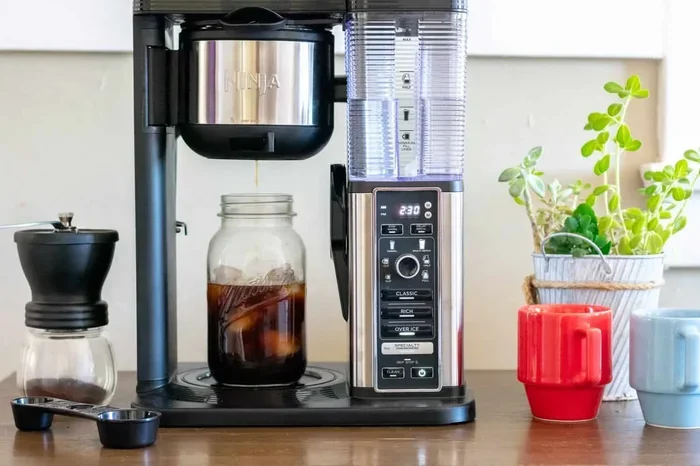
The Ninja Coffee Bar is one of the most popular programmable coffee makers on the market. To turn it off, start by locating the power button on the control panel. It’s usually on the right side or at the top of the machine, depending on your model.
Here’s the step-by-step process:
- Wait for the brewing cycle to fully complete. You’ll hear the machine stop bubbling.
- Remove the drip tray and carafe from the machine.
- Press and hold the power button for about three seconds.
- The display screen will go dark, indicating the machine is fully powered off.
- Unplug the unit from the wall outlet for extra safety.
Some Ninja Coffee Bar models also have a delay brew feature. If you’ve programmed a delayed start, make sure to cancel the brew cycle before turning the machine off. Otherwise, the machine might power back on automatically when the timer triggers.
Ninja Single-Serve Coffee Maker
The single-serve Ninja coffee makers are even simpler to turn off. These compact machines are designed for quick brews, and the shutdown process reflects that simplicity.
- Once your cup is done brewing, the machine will automatically enter standby mode after a few minutes.
- To fully power down, press the brew button once more. This cancels any remaining active functions.
- Locate the power switch on the side or back of the machine and flip it to the “off” position.
- For maximum safety, unplug the machine from the outlet.
If your single-serve model has a programmable timer, you’ll want to disable that feature as part of your shutdown routine. The timer keeps a small amount of power flowing to the internal clock, which means the machine never fully powers down until the timer is cleared.
Ninja Dual Brew and Specialty Models
The higher-end Ninja models, like the Dual Brew Pro and the Specialty Series, come with more features and slightly more complex shutdown procedures. These machines often have multiple buttons and digital displays, so the process requires a few extra steps.
- First, make sure the brewing cycle is completely finished. Check that the reservoir light is no longer blinking.
- Press the menu button to access the main settings screen.
- Navigate to the “Power” or “System” option using the arrow buttons.
- Select “Turn Off” or “Power Down” from the menu.
- The display will go blank, confirming the machine is off.
- As always, unplugging the unit is the safest final step.
These specialty models also have features like brew strength settings and thermal carafe warming. After shutdown, the thermal carafe will keep your coffee warm for a while without any power, which is one of the great benefits of these machines. The warm carafe function doesn’t need the machine to be on to work.
What To Do If Your Ninja Coffee Maker Won’t Turn Off
Sometimes things don’t go as planned. You press the power button, but the Ninja coffee maker keeps running. The display stays lit. The heating element is still warm. What gives? Here are the most common reasons and how to fix them.
Stuck Power Button
A stuck power button is one of the most common reasons a coffee maker won’t shut down. Over time, crumbs, coffee grounds, and dust can get trapped around the button mechanism. This prevents it from making proper contact and sending the “off” signal to the machine’s control board.
Here’s what to do:
- Unplug the machine from the wall outlet immediately.
- Use a soft, dry cloth to clean around the power button area.
- Gently press the button multiple times to try to release any debris.
- If the button still feels sticky or unresponsive, use a can of compressed air to blow out any particles from around the button.
- Plug the machine back in and try pressing the power button again.
If cleaning doesn’t work, the button itself may need to be replaced. This is a simple and inexpensive fix. You can order replacement buttons directly from Ninja’s website or contact their customer service team for help.
Auto Shut Off Malfunction
Most modern Ninja coffee makers come with an auto shut off feature. This safety mechanism automatically powers down the machine after a period of inactivity, usually between two and four hours. But what happens when this feature malfunctions?
A malfunctioning auto shut off can leave your machine running indefinitely. This is not just an annoyance — it’s a genuine safety concern. If your machine’s auto shut off isn’t working, here’s what to check:
- Go into the machine’s settings menu and look for the “Auto Off” or “Sleep Timer” option.
- Make sure the feature is enabled and set to your preferred time limit.
- If the setting is already correct, try resetting the machine. Unplug it for at least 30 seconds, then plug it back in.
- Check for any software or firmware updates from Ninja’s official website.
- If none of these steps work, the control board may need professional repair or replacement.
Never ignore a coffee maker that won’t turn off. Leaving a heating appliance running unattended is a serious fire hazard. If you can’t resolve the issue, unplug the machine every time you’re not using it until you can get it repaired.
Control Panel Freezing
Sometimes the control panel on your Ninja coffee machine simply freezes. The buttons stop responding, the display glitches, and nothing works — including the shutdown command. This is more common than you might think, especially with older models or machines that haven’t been reset in a while.
The fix is simple and effective:
- Unplug the machine from the power outlet.
- Wait at least 60 seconds. This gives the internal capacitors time to fully discharge.
- Press and hold the power button for 10 seconds to drain any remaining charge.
- Plug the machine back in.
- The control panel should reset and respond normally again.
This reset process works for most electronic appliances, not just coffee makers. It clears temporary glitches and refreshes the internal system. Think of it like restarting your phone when it gets glitchy — same concept, different device.
How To Clean and Maintain Your Ninja Coffee Maker After Shutdown
Turning off your machine is only half the battle. Proper maintenance after shutdown keeps your Ninja coffee maker performing at its best and ensures every cup tastes great.
Daily Cleaning Routine
After you power down your Ninja coffee maker, take a few minutes to clean up. This small habit makes a big difference.
- Remove the carafe and pour out any leftover coffee.
- Take out the drip tray and empty any accumulated water or coffee spills.
- Remove the coffee grounds from the reusable filter or dispose of the single-serve pod.
- Wipe down the exterior with a damp cloth to remove splashes and residue.
- Leave the carafe lid off to let the interior air dry overnight.
These simple steps prevent buildup and keep your machine fresh. It only takes about two minutes, but it saves you from deep cleaning headaches later.
Weekly and Monthly Maintenance
Beyond daily cleaning, your Ninja coffee system needs deeper maintenance on a regular schedule. Descaling is the most important task you can do to keep your machine running smoothly.
Descaling removes mineral buildup from the internal heating element and water lines. Hard water is the enemy of every coffee maker, and Ninja machines are no exception. You should descale your machine at least once a month if you have hard water, or every two to three months with soft water.
To descale your Ninja coffee maker, use a dishwasher tablet or a commercial descaling solution. Place the tablet in the reservoir, fill it with water, and run a full brewing cycle without coffee grounds. Then run two more cycles with clean water to rinse out any remaining solution. This process keeps your machine’s internal components clean and your coffee tasting fresh.
Also, make sure to clean the reservoir regularly. Remove it from the machine, wash it with warm soapy water, and dry it thoroughly before putting it back. A clean reservoir prevents mold and bacteria from growing, which can affect the taste of your coffee and the performance of your machine.
Common Mistakes People Make When Turning Off Their Ninja Coffee Maker
Even the most experienced coffee maker users make mistakes. Here are the most common errors people make when shutting down their Ninja machine, and how to avoid them.
Just Letting It Sit in Standby Mode
This is the number one mistake. People assume that because the machine stopped brewing, it’s turned off. But standby mode still draws power and keeps the heating element warm. Over time, this wastes energy and puts unnecessary strain on the machine’s components. Always fully power down your Ninja coffee maker using the proper shutdown method.
Forgetting to Empty the Reservoir
Leaving water sitting in the reservoir overnight can lead to stale water, mineral buildup, and even mold growth. After you turn off your Ninja coffee maker, make it a habit to empty any remaining water from the reservoir. This is especially important if you won’t be using the machine for a day or two.
Ignoring the “Clean” Indicator Light
Most Ninja coffee makers have a cleaning indicator light that reminds you when it’s time to descale or clean the machine. Ignoring this light doesn’t just affect coffee taste — it can also affect how the machine shuts down. A dirty machine with heavy mineral buildup may have difficulty powering off properly or may trigger error codes.
When the clean light comes on, don’t ignore it. Take a few minutes to run a cleaning cycle. Your machine (and your coffee) will thank you. If you want more tips on keeping your Ninja appliances in top shape, check out our guide on how to deep clean your Ninja Air Fryer Oven for maintenance best practices that apply across all Ninja products.
Using the Wrong Cleaning Products
Not all cleaning products are safe for coffee makers. Harsh chemicals, abrasive scrubbers, and bleach-based cleaners can damage the internal components of your Ninja coffee system. Stick to mild dish soap, white vinegar, or a dedicated descaling solution. And never submerge the main machine unit in water — only the removable parts like the carafe, drip tray, and reservoir are dishwasher or hand-wash safe.
Expert Tips for the Best Shutdown Routine
We’ve put together a few pro tips that will help you get the most out of your shutdown routine and keep your Ninja coffee maker in excellent condition.
Create a Shutdown Checklist
It sounds simple, but a checklist can be a game changer. Post it near your coffee maker and follow it every morning after your last cup:
- Brew your final cup of the day.
- Remove the carafe and dispose of any remaining coffee.
- Empty the drip tray and reservoir.
- Press the power button to turn off the machine.
- Flip the power switch to the off position if your model has one.
- Unplug the machine from the wall outlet.
- Wipe down the exterior and leave the carafe lid off to air dry.
This routine takes less than five minutes and protects your investment. It also gives you peace of mind knowing your machine is fully powered down and safe.
Use a Smart Plug for Extra Control
If you want to take your shutdown game to the next level, consider using a smart plug. A smart plug lets you schedule when your Ninja coffee machine gets power. You can set it to cut off electricity at a specific time each night, ensuring your machine is always fully powered down even if you forget to do it manually.
Smart plugs are inexpensive and easy to set up. They’re a great addition to any kitchen and offer an extra layer of safety for all your small appliances, not just your coffee maker.
Store Your Machine Properly When Not in Use
If you’re going on vacation or won’t be using your Ninja coffee maker for an extended period, take a few extra steps. Empty all water from the reservoir and carafe. Clean the drip tray and filter basket thoroughly. Wrap the power cord neatly and store the machine in a cool, dry place. This prevents moisture damage, mold growth, and dust buildup during long periods of inactivity.
Conclusion
Knowing how to turn off Ninja Coffee Maker properly is one of those small habits that makes a big difference. It keeps you safe, saves energy, and extends the life of your machine. From the basic power button press to the full shutdown checklist, you now have everything you need to power down your Ninja coffee machine the right way every single time.
Remember, the key is consistency. Make your shutdown routine part of your daily coffee habit, just like grinding the beans or pouring the first cup. It becomes second nature after a few days, and you’ll never have to worry about whether your machine is properly turned off again.
Take care of your Ninja coffee maker, and it will take care of you — brewing perfect cups of coffee for years to come. And if you ever run into issues beyond just turning the machine off, don’t hesitate to explore our other resources for Ninja coffee system troubleshooting and maintenance tips.
Frequently Asked Questions
Can I just unplug my Ninja Coffee Maker instead of pressing the power button?
Yes, you can unplug your machine as a final step, but it’s best to press the power button first. This sends the proper shutdown signal to the control board and allows the machine to complete any internal cooling cycles. Unplugging without pressing the power button first can sometimes cause error codes or reset your programmed settings.
Why does my Ninja Coffee Maker keep turning back on after I turn it off?
This usually happens when the delay brew or programmable timer feature is still active. Check your settings menu and make sure all scheduled brew times are cleared. If the timer is off and the machine still turns back on, the control board may need to be reset by unplugging the machine for 30 seconds.
Is it safe to leave my Ninja Coffee Maker plugged in when not in use?
While it’s generally safe, it’s not recommended for long periods. Even in standby mode, the machine draws a small amount of power and the internal components remain slightly warm. For maximum safety and energy savings, unplug the machine when you’re not using it, especially overnight or when you leave the house.
How often should I clean my Ninja Coffee Maker to keep it working properly?
You should do a quick daily clean after each use and a deeper descaling every one to three months depending on your water hardness. Regular cleaning prevents mineral buildup, keeps your coffee tasting fresh, and ensures all the machine’s functions — including the shutdown process — work smoothly. For more cleaning tips across Ninja appliances, see our guide on how to clean melted plastic out of an oven for safe cleaning practices.
What should I do if the power button on my Ninja Coffee Maker is not responding?
First, try resetting the machine by unplugging it for 60 seconds and then plugging it back in. If that doesn’t work, check for debris or coffee grounds around the button and clean the area gently. If the button is physically damaged or still unresponsive after cleaning, you may need to replace it. Contact Ninja customer service for replacement parts and warranty support.
Does the Ninja Coffee Maker auto shut off feature work on all models?
Most Ninja coffee maker models include an auto shut off feature, but the timing and settings vary by model. Check your user manual or the settings menu on your display to confirm whether your specific model has this feature and how to adjust the timer. If the auto shut off isn’t working properly, it’s important to address it quickly for safety reasons.