No Power to Gourmia Air Fryer Try These Quick Fixes
Is your Gourmia air fryer not turning on? Don’t worry, you can fix this yourself. A Gourmia air fryer losing power is a common problem with simple solutions. Try these quick fixes to get your air fryer working again fast and save time on repairs.
Key Takeaways
- Check the power outlet and cord first — most no-power issues start with simple electrical problems.
- Reset your Gourmia air fryer by unplugging it for 30 seconds to clear error states.
- Inspect the power cord and plug for visible damage that could block electricity flow.
- Avoid overloading the outlet with other high-wattage kitchen appliances.
- Contact Gourmia support if basic fixes don’t work — your unit may need professional repair.
- Prevent future issues with regular cleaning and proper storage habits.
📑 Table of Contents
Why Your Gourmia Air Fryer Has No Power
You press the button. Nothing happens. Your Gourmia air fryer sits there silently, and you are left wondering what went wrong. This is frustrating, especially when you are craving crispy fries or chicken wings. But here is the good news. Most power problems with a Gourmia air fryer are easy to fix at home.
Before you call a repair tech or throw in the towel, try these steps. A Gourmia air fryer not powering on usually comes down to a few common causes. A tripped outlet, a damaged cord, or a simple reset error could be the culprit. Let us walk through them one by one.
Understanding why your Gourmia air fryer lost power helps you prevent it from happening again. Kitchen appliances like air fryers draw a lot of electricity. Over time, connections can loosen, cords can wear, and internal safety features can kick in. None of these mean your fryer is dead. They just mean it needs a little attention.
The troubleshooting process is straightforward. You do not need special tools or technical skills. Just a careful eye and a few minutes. By the end of this guide, you will know exactly what to check and how to bring your Gourmia air fryer back to life.
Common Reasons a Gourmia Air Fryer Loses Power
Several things can cause a no power to Gourmia air fryer situation. Here are the most frequent ones:
- Tripped circuit breaker — your outlet may have shut off due to overload.
- Loose power connection — the plug may not be fully seated in the outlet.
- Damaged power cord — frayed or cut cords stop electricity from flowing.
- Internal thermal fuse — the fryer may have overheated and shut itself off.
- Faulty outlet — the wall outlet itself may not be delivering power.
- Reset needed — some models require a full reset after a power surge.
Each of these causes has a simple fix. Let us get into the details.
Quick Fixes to Try First
When your Gourmia air fryer has no power, start with the easiest solutions. These quick fixes take less than five minutes and solve the problem most of the time.
Fix 1: Check the Power Outlet
First, make sure the outlet is actually working. Unplug your Gourmia air fryer and plug in another device. A phone charger works great for this. If the other device does not turn on either, the problem is the outlet, not your fryer.
Try plugging your air fryer into a different outlet in another room. This simple test tells you whether the original outlet is the problem. Sometimes a Gourmia air fryer not powering on is as simple as a dead outlet.
Fix 2: Inspect the Power Cord
Look closely at the power cord running from your Gourmia air fryer to the wall. Check for any visible damage. Fraying, cuts, or burn marks are red flags. A damaged cord can completely block power from reaching the unit.
Gently bend the cord along its length. If you feel any stiff spots or see exposed wires, stop using the fryer immediately. Replace the cord or contact Gourmia for a replacement part. Using a damaged cord is a safety risk.
Fix 3: Reset the Air Fryer
Many Gourmia air fryer models have a built-in reset function. Unplug the fryer from the wall outlet. Wait at least 30 seconds. Then plug it back in and try turning it on again.
This reset clears any error codes or temporary electrical glitches. Think of it like restarting a phone. Sometimes the system just needs a fresh start. This simple step fixes more Gourmia air fryer power issues than people realize.
Step-by-Step Troubleshooting Guide
If the quick fixes did not work, do not give up yet. Follow this detailed troubleshooting guide to narrow down the problem. Each step builds on the last, so work through them in order.
Step 1: Test the Outlet with a Multimeter
If you have a multimeter, use it to check whether the outlet is delivering the right voltage. A standard US outlet should show around 120 volts. If it reads zero or very low, the outlet is not supplying power.
You can also use a simple plug-in outlet tester. These cost a few dollars at any hardware store. They light up in patterns that tell you if the wiring is correct. A faulty outlet is a common reason for a Gourmia air fryer losing power.
Step 2: Examine the Power Plug and Connection
Remove the plug from the outlet and inspect both the plug prongs and the outlet slot. Bent or corroded prongs can make poor contact. Clean the prongs with a dry cloth. If they are bent, carefully straighten them with a small flat tool.
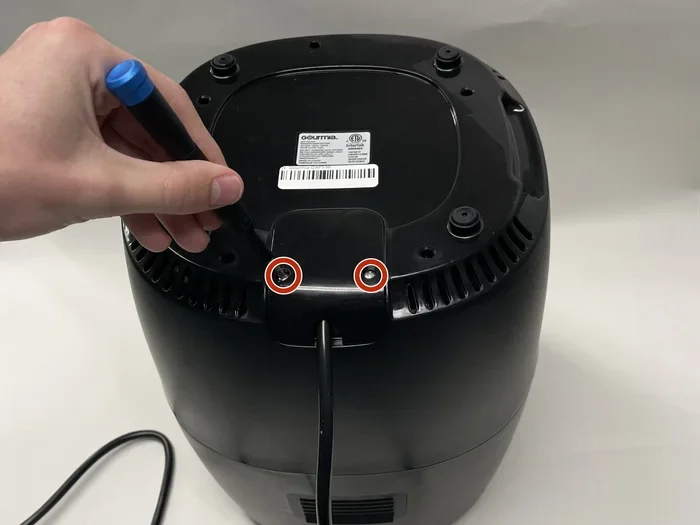
Also check the connection where the cord enters the back of the Gourmia air fryer. If the cord feels loose or wiggles freely, the internal connection may be damaged. This requires professional repair.
Step 3: Look for a Reset Button or Fuse
Some Gourmia air fryer models have a small reset button on the bottom or back of the unit. Look for a tiny pinhole button. Press it gently with a paperclip or toothpick.
Other models have a replaceable thermal fuse inside. If the fuse has blown due to overheating, the fryer will not power on. Check your user manual for fuse location and replacement steps. Fuses are inexpensive and easy to swap out.
Step 4: Check for Overheating Protection
Air fryers have built-in safety features. If your Gourmia air fryer ran too hot, it may have shut itself off automatically. This is called thermal protection. It is a safety feature, not a defect.
Let the fryer cool down completely before trying to turn it on again. This can take 15 to 20 minutes. Once cooled, plug it back in and try again. If the unit powers on, you know overheating was the cause.
Step 5: Rule Out Electrical Surge Damage
A sudden power surge can damage the internal electronics of your Gourmia air fryer. If you experienced a recent storm or power outage, a surge may be to blame. Check if other appliances on the same circuit also stopped working.
Using a surge protector going forward can prevent this problem. It is a small investment that saves your appliances. If surge damage occurred, you may need professional repair or a replacement unit.
Common Mistakes That Cause Power Issues
Many people make simple mistakes that lead to power problems with their Gourmia air fryer. Avoiding these habits keeps your fryer running smoothly.
Overloading the Circuit
Running your air fryer on the same outlet as a microwave or toaster is a common mistake. These appliances draw a lot of power together. The circuit breaker trips, and your Gourmia air fryer loses power.
Plug your air fryer directly into a wall outlet. Avoid using extension cords or power strips for high-wattage appliances. Give your fryer its own dedicated circuit whenever possible.
Ignoring Regular Cleaning
Grease and food buildup inside the fryer can cause overheating. When the unit overheats repeatedly, internal components like the thermal fuse can fail. This leads to a Gourmia air fryer not powering on situation.
Clean your air fryer after every use. Remove the basket, wash it with warm soapy water, and wipe down the interior. Keeping the fryer clean prevents many power-related issues.
Skipping the User Manual
Every Gourmia air fryer model is slightly different. The user manual contains specific troubleshooting steps for your exact model. Skipping it means you might miss a simple fix.
Keep your manual in a safe place. You can also find it online on the Gourmia website by searching for your model number. The manual often includes a dedicated troubleshooting section.
When to Seek Professional Help
Sometimes, home fixes are not enough. Knowing when to call for help saves you time and prevents dangerous mistakes.
Signs You Need Professional Repair
Watch for these warning signs that your Gourmia air fryer needs expert attention:
- Burning smell — this indicates internal electrical damage.
- Visible smoke — never ignore smoke from any appliance.
- Scorched or melted plastic — the internal wiring may be damaged.
- Intermittent power — the fryer turns on and off randomly.
- No response after all troubleshooting steps — the issue may be internal.
If you notice any of these signs, stop using the fryer immediately. Unplug it and contact Gourmia customer support. They can guide you through warranty claims or arrange professional repair.
Warranty and Replacement Options
Check if your Gourmia air fryer is still under warranty. Most Gourmia units come with a one-year limited warranty. If your fryer lost power due to a manufacturing defect, the warranty may cover the repair or replacement.
Keep your purchase receipt and the original box if possible. These make the warranty claim process much smoother. If the warranty has expired, Gourmia may still offer affordable repair options or replacement parts.
Preventing Power Issues in the Future
Once you get your Gourmia air fryer working again, take steps to prevent power problems from returning. Prevention is always easier than repair.
Proper Storage Habits
Store your air fryer in a cool, dry place. Moisture can damage electrical connections over time. Keep it away from heat sources and direct sunlight when not in use. A clean, dry storage spot extends the life of your fryer.
Make sure the cord is not kinked or pinched during storage. A damaged cord leads to power problems. Handle the cord gently and never yank it from the outlet by pulling on the wire.
Regular Maintenance Routine
Set a weekly reminder to inspect your Gourmia air fryer. Check the cord, plug, and basket for any wear or buildup. A few minutes of maintenance each week prevents bigger problems later.
Clean the heating element and interior regularly. Grease buildup can affect performance and cause overheating. A well-maintained air fryer runs efficiently and stays powered on reliably.
Use a Quality Surge Protector
Invest in a good surge protector for your kitchen countertop. This protects your Gourmia air fryer and all your other appliances from power spikes. Look for surge protectors with a joule rating of at least 1000.
A surge protector is a small price to pay for peace of mind. It can save you from costly repairs or the need to replace your fryer entirely. Make it a standard part of your kitchen setup.
Final Thoughts on Fixing Power Issues
A Gourmia air fryer that has no power does not mean the end of the road. Most of the time, the fix is simple and quick. Start with the basics. Check the outlet. Inspect the cord. Reset the unit. These steps solve the problem in the majority of cases.
Keep your fryer clean and well-maintained to avoid future issues. Treat your power cord gently and give your fryer its own dedicated outlet. These small habits make a big difference over time. If all else fails, reach out to Gourmia support for guidance.
Remember that troubleshooting your Gourmia air fryer is a skill anyone can learn. Once you fix the first power issue, you will feel confident handling the next one. Your air fryer is a valuable kitchen tool, and with proper care, it will serve you well for years to come.
Do not let a simple power problem keep you from enjoying crispy, delicious meals. Use the tips in this guide, and your Gourmia air fryer will be back to cooking your favorite foods in no time. Happy frying.
Frequently Asked Questions
Why won’t my Gourmia air fryer turn on?
The most common reason is a power supply issue. Check that the outlet is working, the cord is undamaged, and the plug is fully inserted. Try resetting the fryer by unplugging it for 30 seconds and plugging it back in. If none of these steps work, the internal thermal fuse or electrical component may need professional inspection.
How do I reset my Gourmia air fryer?
Unplug the fryer from the wall outlet and wait at least 30 seconds. This allows the internal electronics to fully reset. Plug it back in and press the power button. Some Gourmia models also have a small reset button on the bottom or back of the unit that you can press with a paperclip.
Is it safe to use a Gourmia air fryer if it won’t power on?
No, do not keep trying to force the unit on if it shows no signs of power. Repeated attempts can cause further damage to the internal components. Unplug the fryer, inspect it for visible damage, and follow the troubleshooting steps in this guide. If the issue persists, contact Gourmia customer support for safe repair options.
Can a power outlet issue cause my air fryer to not work?
Yes, absolutely. A tripped breaker, a faulty outlet, or an overloaded circuit can all prevent your Gourmia air fryer from receiving power. Test the outlet with another device first. If the outlet is the problem, try a different outlet or reset your home’s circuit breaker before using the fryer again.
How do I know if my Gourmia air fryer needs professional repair?
If you notice a burning smell, visible smoke, scorch marks, or intermittent power, stop using the fryer immediately. These are signs of serious internal electrical problems. Also seek professional help if you have tried all the basic troubleshooting steps and the fryer still will not power on. Contact Gourmia support to explore repair or warranty options.
What should I do if my Gourmia air fryer trips the breaker?
First, unplug the fryer and let it cool down completely. Check the power cord for any damage. Try plugging the fryer into a different outlet on a separate circuit. If the breaker trips again, the fryer may have an internal short circuit. Do not keep resetting the breaker. Contact a professional technician or Gourmia support for assistance.
=== INTERNAL LINKS ===
For related troubleshooting guidance on other kitchen appliances, check out How To Fix Breville Coffee Machine for more appliance repair tips. You may also want to review How To Clean Inside Delonghi Coffee Machine for general appliance maintenance advice that applies to all your kitchen devices.