How To Set Timer On Mr Coffee Machine For Perfect Coffee
Setting the timer on your Mr Coffee machine is the easiest way to wake up to fresh, hot coffee every single morning. With just a few simple steps, you can program your Mr Coffee timer to brew at any time that suits your schedule. This guide covers everything from basic setup to advanced features, so you can enjoy perfect coffee without lifting a finger.
Key Takeaways
- Easy Setup: Setting your Mr Coffee timer takes just minutes with our simple step-by-step instructions.
- Fresh Coffee Every Morning: A programmed timer means you wake up to the aroma of freshly brewed coffee.
- Customizable Brew Times: You can set delayed brew times that match your exact schedule.
- Multiple Settings: Modern Mr Coffee machines offer brew strength control and programmable features.
- Troubleshooting Tips: Learn how to fix common timer issues quickly.
- Maintenance Matters: Regular cleaning keeps your timer and machine working perfectly.
📑 Table of Contents
Understanding Your Mr Coffee Machine Timer
A programmable coffee maker is one of the most convenient kitchen appliances you can own. The Mr Coffee timer lets you set a coffee brewing schedule so your machine does the work while you sleep. Whether you are a early riser or a night owl, knowing how to use the auto brew feature changes your entire morning coffee routine.
Most Mr Coffee machines come with a digital display or a simple dial timer. The coffee maker settings allow you to choose when the machine starts brewing. This means wake up to fresh coffee without any effort. The coffee maker display shows the current time and your programmed brew time clearly.
The timer function works by storing your preferred brew time in the machine’s memory. Once set, the automatic coffee maker will turn on at the scheduled time and begin brewing. This is especially helpful on busy weekdays when every minute counts. You just fill the water reservoir and add grounds before bed, and let the machine handle the rest.
Why Use The Timer Function?
Using the Mr Coffee timer offers several real benefits. First, it saves you time in the morning. Second, it ensures your coffee is fresh and hot when you are ready to drink. Third, it helps you maintain a consistent coffee brewing schedule every single day.
Here are the key reasons to use the timer:
- Convenience: Set it once and forget it.
- Freshness: Coffee brews right when you need it.
- Consistency: Every cup tastes the same.
- Time Savings: No waiting for the machine to warm up.
- Energy Efficiency: The machine only runs when needed.
Step-By-Step Guide To Setting The Timer
Setting the Mr Coffee timer is straightforward once you know the steps. Different models may have slightly different buttons, but the general process is very similar. Follow this guide for Mr Coffee instructions that work across most programmable models.
Preparing Your Machine
Before you program the timer, make sure your machine is ready. Start by plugging the coffee maker into a working outlet. Make sure the water reservoir is clean and empty. Place a filter in the basket and add your desired amount of coffee grounds. A proper coffee filter setup ensures the best tasting results every time.
Fill the reservoir with fresh, cold water. The amount of water depends on how many cups you want to brew. Most Mr Coffee machines have markings on the side of the reservoir to help you measure the right amount. Always use clean, filtered water for the best coffee preparation tips.
Programming The Brew Time
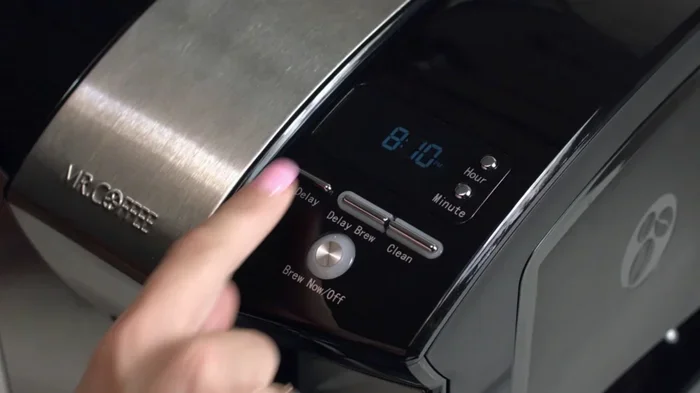
Now it is time to set the actual timer. Press the “Program” or “Set” button on your machine. The coffee maker display will show the current time blinking. Use the hour and minute buttons to set the time you want the coffee to start brewing. This is your set brew time.
Once you have set the desired time, press the “Program” button again to confirm. The machine will save this setting. You should see a indicator light or symbol on the coffee maker display showing that the program is active. Some models also have a “Delay Brew” or “Set Brew Time” label on the button.
Here is a quick checklist for programming:
- Plug in the machine and make sure it is on.
- Add water and coffee grounds.
- Press the “Program” button.
- Set the hour using the hour button.
- Set the minutes using the minute button.
- Press “Program” again to confirm.
- Check that the indicator light is on.
Setting The Brew Strength
Many newer Mr Coffee models include a brew strength control feature. This lets you choose between regular and bold coffee. The coffee machine programming allows you to set both the brew time and the strength level together.
To set the strength, look for a “Bold” or “Strength” button on the control panel. Press it to cycle through the options. The machine will remember your preference along with the timer setting. This is a great coffee preparation tip for people who like their coffee extra strong in the morning.
Tips For Perfect Timer-Set Coffee
Getting the timer right is only half the battle. A few extra steps can make your programmable timer coffee taste even better. These coffee preparation tips help you get the most out of every brew cycle.
Water Temperature Matters
The ideal coffee brewing temperature is between 195 and 205 degrees Fahrenheit. Most Mr Coffee machines heat water to this range automatically. However, the temperature of the water you add to the reservoir can affect the final brew.
Use cold, fresh water from your tap or a filtered source. Avoid using hot water from the tap, as it can contain minerals and off-flavors. The coffee brewing temperature inside the machine is calibrated for cold water input, so always start with cold water for the best results.
Using Fresh Grounds
Fresh coffee grounds make a huge difference in taste. Buy whole beans and grind them just before you set your coffee brewing schedule. Store your grounds in an airtight container away from light and heat.
For the best flavor, use your grounds within two weeks of opening the bag. Stale grounds produce flat, dull coffee no matter how good your machine is. This is one of the simplest yet most overlooked coffee preparation tips.
Keeping Coffee Warm
If you set your delayed brew for early morning but do not plan to drink right away, you might wonder how to keep the coffee hot. Most Mr Coffee machines have a warming plate that keeps the carafe warm for a set period after brewing. However, if you want your coffee to stay hot longer, you can learn how to keep food warm without an oven using similar thermal principles.
Consider using a thermal carafe if your model supports one. These keep coffee hot for hours without burning it. A coffee preparation tip like this can really elevate your morning experience.
Comparison: Manual Brewing vs Timer-Set Brewing
| Feature | Manual Brewing | Timer-Set Brewing |
|---|---|---|
| Morning Effort | High – must start manually | Low – machine starts automatically |
| Freshness | Immediate | Slightly less fresh but still excellent |
| Consistency | Varies | Very consistent |
| Time Savings | None | Significant |
| Setup Required | Each morning | Once the night before |
As you can see, timer-set brewing offers clear advantages for most people. The slight difference in freshness is barely noticeable and is far outweighed by the convenience factor.
Common Timer Problems And Solutions
Even the best programmable coffee maker can have occasional issues with the timer. Most problems are easy to fix with simple troubleshooting. Here are the most common Mr Coffee timer issues and how to solve them.
Timer Not Responding
If the coffee maker display is not responding when you press buttons, the first thing to check is the power connection. Make sure the machine is firmly plugged in. Check your kitchen outlet by plugging in another device to confirm it works.
Sometimes a power surge can reset the machine’s memory. If this happens, simply unplug the machine for 30 seconds, then plug it back in. Set the time and program your coffee brewing schedule again. This fixes the issue in most cases.
Coffee Brewing At The Wrong Time
If your delayed brew starts at the wrong time, the clock may have reset. Check the current time on the coffee maker display and adjust it if needed. The timer will not work correctly if the internal clock is wrong.
Another common cause is accidentally pressing the “Program” button during the day, which can change the settings. Make sure the “Program” indicator light is on when you set the timer and off when you are just using the machine for a regular brew.
Machine Not Starting On Schedule
If the machine does not start at the programmed time, check a few things. First, make sure the “Program” mode is active. The indicator light should be on. Second, check that the water reservoir has enough water. Some machines will not start the brew cycle if the reservoir is empty.
Also check that the carafe is properly seated on the warming plate. Many Mr Coffee machines have a safety feature that prevents brewing if the carafe is not in place. This is a simple fix that catches many people off guard.
Cleaning And Maintenance For Longevity
Regular coffee maker maintenance keeps your timer and machine working perfectly for years. A clean machine brews better coffee and is less likely to have timer issues. Here is how to keep your Mr Coffee in top shape.
Daily Cleaning Routine
After each brew cycle, remove the used filter and grounds. Rinse the carafe with warm water and mild soap. Wipe down the exterior of the machine with a damp cloth. These simple steps take less than two minutes and keep your machine running smoothly.
Make sure the coffee maker display and buttons are clean and free of spills. A damp cloth works well for this. Never use abrasive cleaners on the control panel, as they can damage the buttons and display.
Deep Cleaning Schedule
Once a month, perform a deep clean of your machine. Run a cycle with equal parts white vinegar and water through the reservoir. This removes mineral buildup and keeps the heating element working efficiently.
After the vinegar cycle, run two to three cycles with plain water to rinse out any remaining vinegar taste. This is one of the most important coffee maker maintenance steps you can take.
For tough stains or residue buildup in your kitchen, you might also want to explore general kitchen cleaning methods. For instance, if you ever deal with tough oven stains, you can learn how to clean an oven with a dishwasher tablet without scrubbing as a powerful kitchen cleaning hack.
Dealing With Residue And Spills
Occasionally, coffee grounds or residue can get into areas they should not be. If you notice grounds in the water reservoir or around the control panel, clean them out gently with a soft, damp cloth. Never use sharp objects to scrape away residue, as this can damage internal components.
If plastic parts of your machine become damaged or melted from heat exposure, it is important to address this carefully. Learn how to clean melted plastic out of an oven using safe methods, and apply similar gentle cleaning approaches to any removable plastic parts of your coffee maker.
Advanced Timer Features On Newer Models
Modern Mr Coffee machines come packed with advanced features that go beyond basic timer programming. If you have a newer model, you may have access to smart connectivity and enhanced coffee maker settings.
Smart Connectivity
Some newer Mr Coffee models connect to Wi-Fi and work with smartphone apps. This means you can control your programmable timer coffee from your phone. You can adjust the brew time, change the strength, and even start a brew cycle remotely.
The smart connectivity feature lets you update your coffee brewing schedule on the go. Forgot to set the timer before bed? No problem. Just open the app and program it from your couch or bed. This is a game-changer for busy households.
Multiple Brew Settings
Advanced models offer multiple brew settings for different coffee styles. You can program a small cup for mornings and a full pot for weekends. The brew strength control lets you customize each profile separately.
Some machines also include a “Ready Alert” feature that beeps when the coffee is done brewing. This is helpful if you set the timer for a specific time and want to know exactly when your morning coffee routine can begin.
Final Thoughts On Mastering Your Mr Coffee Timer
Learning how to set timer on Mr Coffee machine is one of the simplest yet most rewarding skills you can develop in the kitchen. The Mr Coffee timer transforms your morning routine by delivering fresh, hot coffee at exactly the time you want it. With just a little practice, programming your coffee brewing schedule becomes second nature.
Remember to use fresh grounds, clean water, and a proper coffee filter setup for the best results. Keep your machine well-maintained with regular cleaning, and troubleshoot any timer issues quickly using the tips in this guide. Your automatic coffee maker is designed to make your life easier, and the timer feature is at the heart of that convenience.
Take a few minutes tonight to set up your Mr Coffee timer for tomorrow morning. Once you experience the joy of wake up to fresh coffee without lifting a finger, you will never go back to manual brewing. The perfect morning starts the night before with a simple timer setting.
Follow the Mr Coffee instructions in this guide, experiment with different coffee maker settings, and enjoy the process of perfecting your daily cup. A well-timed brew is the foundation of a great morning, and your Mr Coffee timer is the tool that makes it all possible.
Frequently Asked Questions
How Do I Reset The Timer On My Mr Coffee Machine?
To reset the timer, unplug the machine from the outlet for at least 30 seconds. Plug it back in and press the “Program” button. The display will show the current time, and you can set a new brew time from there. This clears any previous programming and gives you a fresh start with your coffee machine programming.
Can I Set My Mr Coffee Machine To Brew Multiple Times A Day?
Most standard Mr Coffee models only allow one programmed brew time per day. However, some newer smart models with app connectivity may support multiple scheduled brews. Check your specific model’s manual for details on programmable timer coffee features and multi-brew capabilities.
Why Does My Coffee Taste Different When Brewed Using The Timer?
Timer-set coffee may taste slightly different because the grounds sit in the water longer before brewing begins. To improve flavor, use freshly ground beans and make sure the water and grounds are fresh. Also, the coffee brewing temperature may drop slightly overnight, which can affect extraction and taste.
What Is The Best Type Of Coffee Filter To Use With A Timer-Set Mr Coffee Machine?
Use a flat-bottom paper filter that matches your Mr Coffee model for the best results. Paper filters produce a cleaner cup by removing oils and fine particles. Reusable gold-tone filters work well too but may let more sediment through, especially with a delayed brew where the coffee sits longer in the carafe.
How Long Before Bed Should I Set The Timer On My Mr Coffee Machine?
Set the timer about 15 to 30 minutes before you want to wake up. This gives the machine enough time to complete the full brew cycle and allows the coffee to settle in the carafe. Planning your coffee brewing schedule this way ensures you get the freshest possible cup right when your alarm goes off.
Can I Use The Timer Feature If I Do Not Have The Original Mr Coffee Manual?
Yes, you can. Most Mr Coffee machines follow the same basic programming steps regardless of the model. Press the “Program” button, set the current time, then set your desired brew time using the hour and minute buttons. For detailed Mr Coffee instructions specific to your model, you can usually find the manual on the Mr Coffee website or by searching the model number online.