How To Reset Ninja Foodi Air Fryer in Simple Steps
Learn how to reset Ninja Foodi Air Fryer quickly and easily with our simple step-by-step guide. Whether your air fryer is frozen, unresponsive, or not working as expected, a reset can solve most common issues in minutes. This guide walks you through every method so you can get back to cooking your favorite meals without any hassle.
Key Takeaways
- Unplug the Ninja Foodi: Always disconnect power for five minutes before attempting any reset.
- Check for error codes: Error messages guide you toward the correct reset method.
- Perform a factory reset: Hold the reset button for ten seconds to restore defaults.
- Reset after firmware updates: A restart ensures new settings apply correctly and fully.
- Contact Ninja support: Persistent issues may require professional help beyond a simple reset.
- Regular maintenance prevents problems: Cleaning the basket and vents keeps your fryer running smoothly.
📑 Table of Contents
- Why You Might Need to Reset Your Ninja Foodi Air Fryer
- How To Reset Ninja Foodi Air Fryer: Step-by-Step Guide
- Different Reset Methods for Your Ninja Foodi
- Common Problems After Resetting and How to Fix Them
- Tips to Keep Your Ninja Foodi Running Smoothly
- When to Contact Ninja Support
- Key Takeaways and Final Thoughts
Why You Might Need to Reset Your Ninja Foodi Air Fryer
So your Ninja Foodi Air Fryer is acting up. Maybe it won’t turn on, the display is blinking weirdly, or the cooking results just don’t seem right. Before you panic and start looking for a replacement, take a breath. In many cases, a simple reset can fix the problem. Learning how to reset Ninja Foodi Air Fryer is one of the most useful skills you can pick up as an owner. It saves time, money, and a whole lot of frustration.
Think of it like restarting your phone. When things freeze or glitch, a restart often clears the mess. The same idea applies here. Your air fryer has internal settings and programs that can sometimes get stuck or confused. A reset clears those errors and brings everything back to a clean starting point. Sometimes you just need to reset air fryer settings and you are good to go.
There are several reasons your appliance might need a reset. Power surges, unusual cooking patterns, or even dust buildup can interfere with normal operations. You might notice error codes flashing on the air fryer display. Or perhaps the unit refuses to start a new cooking cycle. These are all signs that a Ninja Foodi reset is in order. Let’s walk through everything you need to know.
How To Reset Ninja Foodi Air Fryer: Step-by-Step Guide
The good news is that resetting your Ninja Foodi Air Fryer is pretty straightforward. You do not need any special tools or technical knowledge. Most resets take less than a minute. Below, we will cover the most common methods. Follow the steps carefully, and you should have your unit back to normal in no time.
Basic Power Reset
This is the simplest and most common method. It works like a soft reboot for your kitchen appliance. Here is what you need to do:
- Unplug the Ninja Foodi Air Fryer from the wall outlet.
- Wait for at least 60 seconds. This gives the internal components time to fully power down.
- Plug the unit back in.
- Turn it on and check if the display is clear and responsive.
That is really all there is to it. This power reset resolves most minor issues. Think of it as giving your air fryer a fresh start. If the problem persists after this step, do not worry. We will move to more specific methods next.
Resetting via the Control Panel
Some Ninja Foodi models allow you to reset settings directly from the control panel. This method is handy when the unit is powered on but behaving strangely. Try these steps:
- Press the power button to turn the unit off completely.
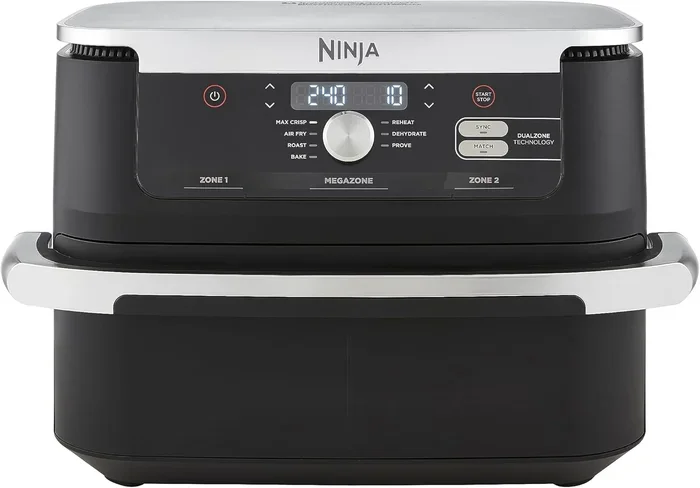
- Press and hold the temperature and time buttons together for about 5 seconds.
- Release the buttons when the display flashes or turns off.
- Turn the unit back on. The settings should now be restored to default.
Keep in mind that this method varies slightly between models. Always check your Ninja Foodi manual for model-specific instructions. If you no longer have the manual, you can usually find a digital copy on the Ninja website. This kind of air fryer settings reset is great for clearing out stored error states.
Different Reset Methods for Your Ninja Foodi
Not all resets are the same. Depending on the issue you are facing, you might need a different approach. Let us break down the main reset Ninja Foodi Air Fryer methods so you can pick the right one.
Factory Reset
A factory reset brings your air fryer back to its original settings. This is the most thorough option. It erases any custom programs or adjustments you have made. Use this method when nothing else seems to work. Here is how to do it:
- Unplug the unit and wait at least 2 minutes.
- Hold down the power button for 10 seconds while the unit is unplugged.
- Plug it back in while still holding the power button.
- Release the button when the display resets or flashes.
A factory reset is like hitting the “clean slate” button. It clears out everything and starts fresh. This method works well for persistent error codes or unresponsive screens. Just remember, you will need to re-enter your preferred cooking settings afterward.
Soft Reset vs Hard Reset
Understanding the difference between a soft reset and a hard reset matters. A soft reset simply restarts the device without erasing data. Think of unplugging and plugging back in. A hard reset goes deeper and restores factory settings. Here is a quick comparison:
- Soft Reset: Quick, easy, and preserves your settings. Best for minor glitches.
- Hard Reset: More thorough, erases custom settings. Best for serious problems.
Start with a soft reset every time. Only move to a hard reset if the soft reset does not solve the problem. This approach saves you from losing custom programs unnecessarily. It also mirrors how you would troubleshoot Ninja Foodi issues in a logical order.
Common Problems After Resetting and How to Fix Them
Sometimes even after a reset, issues can linger. Do not stress. These situations are more common than you think. Let us look at a few typical problems and what you can do about them.
Display Still Blinking or Error Codes Persist
If your air fryer display keeps showing error codes after a reset, the problem might be hardware-related. First, make sure the unit is properly plugged in. Check the power cord for any visible damage. Sometimes a loose connection causes persistent error signals. If the cord looks fine, try a different outlet. Some power sources simply do not deliver stable current.
You may also want to check the heating element and fan area. Dust or debris can cause sensors to trigger false errors. Giving the inside a careful cleaning can help. If you have experience cleaning kitchen appliances, you know how important it is to keep components free from buildup. You can learn more about deep cleaning techniques by reading about how to clean inside Delonghi coffee machine. The principles of removing buildup and debris are very similar across small kitchen appliances.
Air Fryer Not Heating Properly
Another common issue after a reset is uneven or absent heating. This could be caused by a few things. Check the heating element for visible damage. Make sure nothing is blocking the fan. A clogged fan reduces airflow and hurts cooking performance. Also verify that the air fryer temperature settings are correct after the reset. Sometimes a reset defaults to a lower temperature, so you may need to adjust manually.
Unit Making Unusual Noises
Noises after a reset can be alarming. Usually, they are harmless. The fan might need a moment to settle. If the noise continues, check whether anything is stuck inside the basket. Small food particles can rattle around and create sounds. Removing them usually solves the problem immediately. If the noise persists, let the unit cool down completely before inspecting further. This is a standard part of air fryer maintenance.
Tips to Keep Your Ninja Foodi Running Smoothly
Prevention is always better than cure. Taking good care of your Ninja Foodi Air Fryer reduces the chances of needing frequent resets. Here are some practical tips to keep your unit in top shape.
Clean Regularly
Regular cleaning is the single most important thing you can do. Remove food debris from the basket and tray after every use. Wipe down the interior with a damp cloth. Never use abrasive cleaners on the non-stick surfaces. A clean air fryer cooks better and lasts longer. Think about how you would maintain a quality coffee maker. Just as you would follow guides like how to reset descale on Keurig coffee maker to keep your brewer running well, your air fryer also needs consistent upkeep to perform at its best.
- Empty the crumb tray after every few uses.
- Wash the basket and tray with warm, soapy water.
- Wipe the heating element area gently with a soft cloth.
- Never submerge the main unit in water.
Use the Right Settings for Different Foods
Using incorrect air fryer settings can strain the motor and heating element. Each type of food benefits from specific temperature and time combinations. For example, crispy foods like fries do well at higher temperatures. Delicate items like fish need lower heat. Taking a few extra minutes to set things right leads to better results and less wear on the machine.
Give It Space
Your Ninja Foodi Air Fryer needs proper ventilation. Do not push it against a wall or place items on top. The exhaust vent needs clear space to release heat. Cramming it into a tight spot causes overheating and can trigger safety shutoffs. Give it at least 4 to 6 inches of space on all sides. This small step makes a big difference in performance and longevity.
Avoid Overloading the Basket
It might be tempting to cook large batches, but overloading hurts results. Crowded food does not cook evenly. The hot air cannot circulate properly. This forces the unit to work harder and run longer. Stick to the recommended fill lines inside the basket. Your food tastes better too when it is not stacked on top of itself. A well-loaded basket with room to breathe is always the better choice.
When to Contact Ninja Support
At some point, a reset simply will not fix the problem. That is okay. There are times when professional help is the right move. Here are signs that it is time to reach out to Ninja customer support:
- The unit shows no signs of power even after a full Ninja Foodi reset.
- You smell burning or see smoke coming from the vents.
- The display remains completely blank after multiple reset attempts.
- Error codes keep returning within minutes of being cleared.
- The heating element stays cold even when set to high heat.
Before contacting support, gather your model number and proof of purchase. These details speed up the process. You can reach Ninja support through their official website or by phone. They are generally very helpful and can walk you through advanced air fryer troubleshooting steps. If your unit is still under warranty, you may qualify for a free replacement or repair. Do not hesitate to use that benefit. You invested in a quality air fryer, and the support team is there to help you get the most out of it.
It is also worth noting that some issues might stem from using the appliance in ways it was not designed for. For instance, trying to cook overly greasy foods without proper preparation can cause smoke and odd smells. If you love experimenting with recipes, you might enjoy learning different cooking techniques. For example, if you like exploring creative coffee drinks, you could check out guides like how to make Smores iced coffee or how to make your own coffee frappuccino to expand your kitchen skills beyond just air frying. Having a broad set of kitchen skills always helps!
Remember, no appliance is perfect. Even the best Ninja Foodi Air Fryer can run into issues. The key is knowing how to address them calmly and effectively. A simple reset solves most problems. More serious issues warrant professional attention. Either way, you now have the knowledge to handle whatever comes your way.
Key Takeaways and Final Thoughts
Resetting your Ninja Foodi Air Fryer is a simple but powerful skill. It can fix most common issues without any cost or hassle. We covered the basic power reset, control panel reset, and factory reset methods. We also looked at what to do when problems persist after a reset and how to keep your unit running smoothly through proper maintenance.
Here is a quick summary of what we learned:
- Start with a simple power reset whenever your air fryer acts up.
- Try a control panel reset for display or settings issues.
- Use a factory reset as a last resort for deep-seated problems.
- Clean your air fryer regularly to prevent most issues.
- Contact Ninja support if resets do not solve the problem.
The most important takeaway is this: do not panic when your Ninja Foodi Air Fryer glitches. Most problems have simple solutions. A reset Ninja Foodi Air Fryer procedure takes just seconds. Keep this guide bookmarked so you can refer back whenever needed. Your air fryer is a fantastic kitchen tool, and with proper care and the right reset techniques, it will serve you well for years to come. Now go ahead, fire up that air fryer, and get cooking!
Frequently Asked Questions
How To Reset Ninja Foodi Air Fryer when it won’t turn on?
Unplug the air fryer from the wall outlet and wait for at least 5 minutes. This allows the internal circuitry to fully discharge and reset. Plug it back in and try powering it on again.
How To Reset Ninja Foodi Air Fryer after a software glitch?
A soft reset often fixes minor software glitches without losing your saved settings. Simply hold down the power button for about 10 seconds until the screen goes blank. The unit will restart automatically and return to normal operation.
How To Reset Ninja Foodi Air Fryer to factory settings?
To restore factory defaults, locate the reset button on the back or bottom of the unit. Use a small pin or paperclip to press and hold it for 3 to 5 seconds. This clears all custom settings and returns the fryer to its original configuration.
Why won’t my Ninja Foodi Air Fryer respond after resetting?
If the unit still doesn’t respond after a reset, check that the power cord is securely plugged into a working outlet. A tripped circuit breaker or a damaged power cable can also prevent the fryer from turning on. Try a different outlet to rule out electrical issues.
How To Reset Ninja Foodi Air Fryer when the display is flashing or showing an error code?
Flashing displays and error codes usually indicate a sensor issue or overheating. Unplug the fryer, wait 10 minutes, and then plug it back in to reset the system. If the error persists, consult the user manual for the specific code meaning.
Do I lose my cooking presets after How To Reset Ninja Foodi Air Fryer?
A soft reset typically preserves your saved presets and custom programs. However, a factory reset will erase all stored settings and return them to the original defaults. After a factory reset, you may need to reconfigure your preferred cooking times and temperatures.