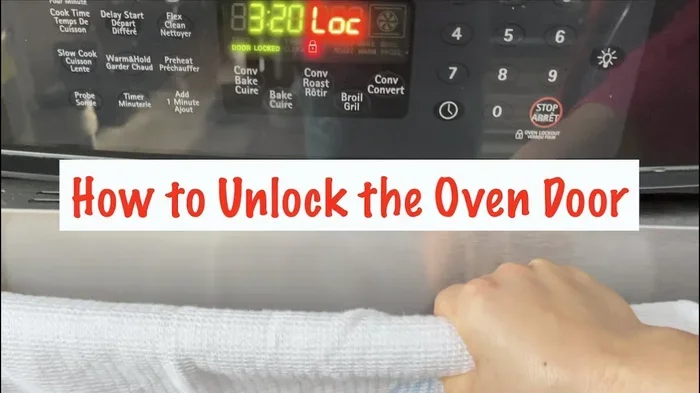
Whirlpool Oven Locked How To Unlock Your Door Fast
A Whirlpool oven locked situation can be frustrating, but unlocking it is usually simple and fast. Whether the oven door lock engages during self-clean mode or a control lock is activated, this guide shows you exactly how to fix it. You will learn proven methods to unlock oven door mechanisms, troubleshoot common problems, and prevent future lockouts. No special tools or professional help are needed for most solutions.
You just finished cooking dinner and now you want to open your Whirlpool oven. But the door is stuck. It will not budge. You push. You pull. Nothing happens. This is a more common problem than most people think, and it happens to Whirlpool oven owners all the time. The good news is that a Whirlpool oven locked situation is almost always fixable without calling a repair technician. You do not need expensive parts or special skills. In this guide, you will learn every method to unlock your oven door quickly and safely. We will cover why ovens lock in the first place, how to release different types of locks, and what to do when nothing seems to work. By the end of this article, you will feel confident tackling any oven door unlock challenge on your own.
The Whirlpool oven door lock is a safety feature. It is not there to annoy you. During the self-clean cycle, the oven reaches extremely high temperatures, sometimes over 900 degrees Fahrenheit. At those temperatures, the door locks automatically to prevent burns, fires, and other hazards. Similarly, the control lock feature keeps the oven from being accidentally turned on or adjusted. Both locks serve an important purpose. But when you need to open the oven and the door will not move, knowing how to release the lock becomes essential. This article gives you clear, actionable steps for every lock type on Whirlpool ovens.
Key Takeaways
- Self-clean lock releases automatically: Most Whirlpool ovens unlock once the oven cools down to a safe temperature after the self-clean cycle ends.
- Control lock can be toggled easily: Press and hold the lock button on the control panel for 3 to 5 seconds to disable the control panel lock.
- Cooling down is essential: Never force the oven door open while the interior is still hot, as the thermal lock is a safety feature designed to protect you.
- Manual release exists on most models: Many Whirlpool ovens have a small latch or keyhole behind the door panel for emergency access.
- Resetting the oven often solves the issue: A simple power reset by unplugging the oven for 60 seconds can clear temporary lock errors.
- Child lock is different from door lock: Understanding the difference helps you apply the right fix quickly.
- Call a professional if basic steps fail: A broken oven door latch or faulty door hinge may need expert repair.
📑 Table of Contents
- Why Does Your Whirlpool Oven Get Locked?
- How To Unlock Your Whirlpool Oven Door Step by Step
- Common Whirlpool Oven Lock Issues and How To Fix Them
- Preventing Your Whirlpool Oven From Locking Up
- When To Call Professional Help for a Locked Whirlpool Oven
- Whirlpool Oven Lock Features Explained
- Quick Tips for a Locked Whirlpool Oven
- Key Takeaways
Why Does Your Whirlpool Oven Get Locked?
Understanding why your Whirlpool oven locks up is the first step to fixing it. Ovens lock for several reasons, and each reason has a specific solution. Let us break down the most common causes.
The Self-Clean Lock Mechanism
The self-clean lock is the most common reason a Whirlpool oven door gets stuck. When you start the self-clean cycle, the oven heats up to burn off food residue. During this process, the oven door latch engages and locks the door shut. This is a safety feature that prevents you from opening the door while temperatures are dangerously high. Once the self-clean cycle finishes, the oven begins to cool down. The lock releases when the interior temperature drops to a safe level, usually around 200 degrees Fahrenheit. This cooling process can take 30 minutes to over an hour depending on your model.
The Control Panel Lock
Many modern Whirlpool ranges and ovens come with a control panel lock feature. This lock disables all buttons on the control panel to prevent accidental changes. It is especially useful in households with young children. When the control lock is active, the oven may appear unresponsive. The door itself is not physically locked in this case, but the oven will not start or adjust until the lock is released. This is different from the door lock and requires a different fix.
The Thermal Lock Safety Feature
Whirlpool ovens have a built-in thermal lock that engages whenever the oven interior is too hot. This is separate from the self-clean lock. If you have been baking or broiling and the oven is still warm, the thermal lock may prevent the door from opening fully. This is a protective mechanism. It keeps you from reaching into a hot oven and getting burned. The lock releases once the oven cools to a safe touch temperature.
The Child Lock Feature
Some Whirlpool oven models include a child lock feature. This locks the controls and sometimes the door to prevent small children from operating the oven. If you have kids at home, this might be the reason your oven door won’t open. The child lock is easy to activate and just as easy to deactivate once you know where the setting is hidden.
How To Unlock Your Whirlpool Oven Door Step by Step
Now that you know why your oven is locked, let us get into the solutions. Each method below addresses a specific lock type. Follow the steps that match your situation.
Method One: Wait for the Self-Clean Lock to Release
If your oven was in self-clean mode, the door lock will release on its own. Here is what to do:
- Turn off the self-clean cycle if it is still running. Press the cancel button on the control panel.
- Do not try to open the door. The lock will not release until the oven cools sufficiently.
- Wait for 30 to 90 minutes. The exact time depends on how hot the oven was during the cleaning cycle.
- Check the door periodically. Gently try to pull the door open after 30 minutes. You should feel some give.
- Open the door fully once the lock releases. You will hear a click or feel the latch disengage.
This is the simplest and safest method. Patience is the key here. Do not use force or try to pry the door open. Forcing the door can damage the oven door hinge or the door spring, leading to expensive repairs.
Method Two: Release the Control Panel Lock
If your oven controls are locked but the door is not physically stuck, follow these steps:
- Locate the lock button on your Whirlpool control panel. It may be labeled “Lock,” “Control Lock,” or show a padlock icon.
- Press and hold the lock button for 3 to 5 seconds. On some models, you need to press it twice.
- Listen for a beep or watch for the lock indicator light to turn off.
- Try pressing the oven buttons again. They should respond normally once the lock is released.
If this does not work, try a different approach. On many Whirlpool models, you need to press and hold the bake and broil buttons simultaneously for 3 seconds. Check your Whirlpool oven manual for the specific key combination for your model. The manual is also available online on the Whirlpool website.
Method Three: Perform a Power Reset
A power reset can clear many temporary lock issues on Whirlpool ovens. This works when the control lock is stuck or the oven displays an error code.
- Turn off the oven using the control panel.
- Unplug the oven from the wall outlet. If the oven is hardwired, turn off the circuit breaker.
- Wait for 60 seconds. This gives the oven’s electronic components time to fully reset.
- Plug the oven back in or turn the breaker back on.
- Wait for the oven to power up. The display should light up and show the clock or home screen.
- Try using the oven again. The lock should be cleared.
This method works because it clears the oven’s temporary memory. Sometimes a software glitch or a momentary power surge can cause the lock to engage even when you did not activate it. A reset clears this state completely.
Method Four: Use the Manual Release on Your Whirlpool Oven
Most Whirlpool ovens have a manual release mechanism built into the door. This is a backup method for when the electronic lock fails to release.
- Open the oven door slightly if there is any gap at all. Even a small crack will help.
- Look at the bottom of the door near the hinges. You may see a small metal tab or lever.
- Push or pull the tab gently while trying to open the door. This releases the oven door latch mechanically.
- On some models, there is a small keyhole on the lower front panel. Use the included key or a straightened paperclip to turn it.
Not all Whirlpool models have a manual release. Check your owner’s manual or visit the Whirlpool support website to see if your specific model includes this feature. Using the manual release correctly will not damage your oven.
Common Whirlpool Oven Lock Issues and How To Fix Them
Sometimes the standard methods do not work. When your Whirlpool oven door lock still will not release, there are specific problems you can check for.
The Door Will Not Open After Self-Clean
This is the most common complaint among Whirlpool owners. The oven has cooled down, but the door is still locked. Here is what is likely happening:
- The oven did not cool enough. Even though it feels cool on the outside, the interior may still be above the release temperature. Wait another 15 to 20 minutes.
- The lock motor is stuck. Over time, grease and food debris can build up around the oven door latch mechanism. This can cause the motor to jam. Try gently tapping the lock area with the handle of a wooden spoon to dislodge any debris.
- A sensor is malfunctioning. The oven may incorrectly detect that the interior is still hot. This is a sensor issue that may require professional diagnosis.
The Control Lock Will Not Turn Off
If the control panel lock stays active even after you follow the release steps, try these troubleshooting tips:
- Try a different button combination. Some Whirlpool models use Lock and Oven buttons together, while others use a specific sequence. Consult your model’s manual.
- Clean the control panel. Food spills and grease around the buttons can cause the lock button to stick. Wipe the panel with a damp cloth and dry it thoroughly.
- Perform a full power reset. Unplug the oven for at least two minutes, then plug it back in. This resets all electronic functions including the lock.
The Oven Shows an Error Code and Will Not Unlock
Whirlpool ovens display error codes when something goes wrong. A lock-related error code often appears as F1, F2, F3, F4, or F9 depending on the model. These codes indicate different issues:
- F1 error: Usually indicates a control board malfunction. The control panel lock may be stuck as a result.
- F9 error: Often relates to the door lock motor or switch. The oven cannot detect whether the door is locked or unlocked.
- F3 or F4 error: Related to temperature sensors. The oven may think it is still hot and keep the thermal lock engaged.
For most error codes, a power reset is the first step. If the code returns after resetting, you may need to replace a faulty part. Contact Whirlpool customer service for parts and repair guidance specific to your model number.
Physical Damage to the Oven Door or Latch
In some cases, the lock problem is caused by physical damage. This can happen if someone tried to force the door open while it was locked. Signs of physical damage include:
- The oven door hinge is bent or loose.
- The door spring is broken or stretched out.
- The latch mechanism is visibly damaged or missing pieces.
- The door sits unevenly when closed.
Physical damage requires replacement parts. Whirlpool sells replacement door latch assemblies, hinges, and springs directly. You can also order them through authorized parts retailers. If you are not comfortable replacing these parts yourself, a certified Whirlpool technician can handle the repair for you.
Preventing Your Whirlpool Oven From Locking Up
Prevention is always better than cure. Here are simple habits that can keep your Whirlpool oven from locking up unexpectedly.
- Avoid using the self-clean cycle too frequently. Excessive self-cleaning puts stress on the door lock mechanism and the oven door hinge. Clean your oven manually with mild cleaner between self-clean cycles.
- Keep the oven interior clean. Food spills and grease buildup can interfere with the lock mechanism. Wipe down the oven after every use.
- Do not force the door open. If the door is locked, wait for the lock to release naturally. Forcing it can damage the door spring and latch.
- Know your model’s lock features. Read through the owner’s manual so you understand how each lock type works on your specific Whirlpool oven.
- Schedule regular maintenance. Have a professional inspect your oven every 12 to 18 months. They can check the lock mechanism, hinges, and springs before problems develop.
When To Call Professional Help for a Locked Whirlpool Oven
Most lock issues are simple and fixable at home. But there are times when professional help is the right choice. You should call a technician if:
- The door lock motor is completely dead. You hear no sound when the oven tries to engage or release the lock.
- The oven displays a persistent error code that does not clear after a power reset.
- The oven door latch is physically broken or a part is missing.
- The door will not open at all even after waiting several hours and trying all the methods in this guide.
- You smell gas or see damage inside the oven. Safety always comes first.
When you call for help, have your oven model number ready. You can find it on a sticker inside the oven door or on the back of the unit. The model number helps the technician order the correct parts and prepare for the repair before they arrive. Whirlpool customer service can also help you troubleshoot over the phone and determine whether you need an in-home repair or a part replacement.
Whirlpool Oven Lock Features Explained
Whirlpool ovens come with several built-in lock features designed for safety and convenience. Understanding each one helps you respond quickly when a lock engages unexpectedly.
The Door Lock Assembly
The door lock assembly is the mechanical system that physically secures the oven door during high-temperature cycles. It includes the latch, the lock motor, the switch, and the linkage. All of these parts work together to lock and release the door. When one part fails, the entire assembly can malfunction. Regular cleaning and gentle use help extend the life of this assembly.
The Electronic Control Lock
The electronic control lock is a software-based feature. It disables the buttons on the control panel to prevent accidental operation. This lock does not affect the physical door. It is controlled through the oven’s digital interface and can be toggled on and off with the correct button sequence. If the electronic lock malfunctions, a power reset usually fixes it.
The Thermal Protection Lock
The thermal protection lock is a safety feature that prevents the door from opening when the oven interior exceeds a safe temperature. This is different from the self-clean lock because it activates during any high-heat cooking, not just during the self-clean cycle. The lock releases automatically once the oven cools down. This feature is non-negotiable and is a critical safety component of every Whirlpool oven.
Quick Tips for a Locked Whirlpool Oven
Here are some fast tips to keep in mind the next time your Whirlpool oven door gets stuck:
- Stay calm. Most lock situations resolve on their own with a little patience.
- Never use sharp tools to pry the door open. This can damage the oven door hinge and void your warranty.
- Check the manual. Your Whirlpool oven manual has model-specific instructions for every lock type.
- Keep the model number handy. It speeds up troubleshooting and makes calling customer service much easier.
- Unplug before inspecting. Always disconnect power before reaching inside the oven or checking the lock mechanism.
Key Takeaways
- Self-clean lock releases automatically: Most Whirlpool ovens unlock once the oven cools down to a safe temperature after the self-clean cycle ends.
- Control lock can be toggled easily: Press and hold the lock button on the control panel for 3 to 5 seconds to disable the control panel lock.
- Cooling down is essential: Never force the oven door open while the interior is still hot, as the thermal lock is a safety feature designed to protect you.
- Manual release exists on most models: Many Whirlpool ovens have a small latch or keyhole behind the door panel for emergency access.
- Resetting the oven often solves the issue: A simple power reset by unplugging the oven for 60 seconds can clear temporary lock errors.
- Child lock is different from door lock: Understanding the difference helps you apply the right fix quickly.
- Call a professional if basic steps fail: A broken oven door latch or faulty door hinge may need expert repair.
Frequently Asked Questions
How long does it take for a Whirlpool oven door lock to release after self-clean?
It typically takes 30 to 90 minutes for the Whirlpool oven door lock to release after a self-clean cycle. The exact time depends on the oven model and how high the temperature reached during cleaning. Always wait for the oven to cool to a safe temperature before attempting to open the door.
Can I force my Whirlpool oven door open if it is locked?
No, you should never force the door open. Forcing it can damage the oven door hinge, the door spring, or the latch mechanism. It can also void your Whirlpool warranty. Always wait for the lock to release naturally or use the manual release method described in your owner’s manual.
Why does my Whirlpool oven door stay locked even after it cools down?
If the door stays locked after cooling, the lock motor may be jammed with grease or food debris. A power reset often clears this issue. If a reset does not work, there may be a faulty switch or sensor. In that case, contacting Whirlpool customer service for professional diagnosis is the best next step.
How do I turn off the control lock on my Whirlpool oven?
To turn off the control panel lock, press and hold the lock button for 3 to 5 seconds. On some models, you need to press the bake and broil buttons together for 3 seconds. Check your oven’s manual for the exact sequence for your specific model number.
Is it safe to use the oven if the door lock is slightly stuck?
No, it is not safe to cook with a stuck door lock. A malfunctioning lock can cause the door to open during cooking, leading to burns or fire hazards. Always resolve the lock issue before using the oven again. If you cannot fix it yourself, have a professional inspect the oven before using it.
What Whirlpool oven models have a manual door release?
Most Whirlpool oven models from the past 20 years include a manual release feature. It is usually a small tab or keyhole located at the bottom front of the oven door or behind the lower panel. Check your specific model’s manual or visit the Whirlpool website to confirm the location of the manual release on your oven.
A Whirlpool oven locked situation is stressful but almost always solvable with the right approach. Whether it is a self-clean lock, a control panel lock, or a thermal lock, the solutions are straightforward. You can wait for the oven to cool, toggle the control lock, perform a power reset, or use the manual release mechanism. Each method is safe and does not require special tools or professional training. Prevention also plays a big role. Keeping your oven clean, using the self-clean cycle wisely, and understanding your model’s lock features will help you avoid future lockouts. If none of the methods work, do not hesitate to contact Whirlpool customer service or a certified technician. Your safety and the longevity of your oven matter most. Now you have the knowledge to handle any oven door unlock situation quickly and confidently. Go ahead and put these tips to use the next time your Whirlpool oven door gives you trouble.