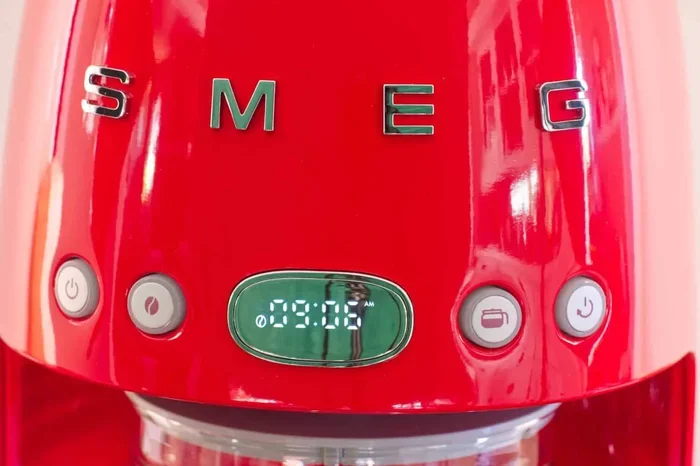
How To Change Clock On Smeg Coffee Maker Step By Step
Changing the clock on your Smeg coffee maker is a quick and easy process that anyone can do. This guide walks you through every step, from locating the clock button to saving your new time settings. You will also learn troubleshooting tips and common mistakes to avoid.
There is something deeply satisfying about waking up to a freshly brewed cup of coffee. Your Smeg coffee maker is more than just a kitchen gadget. It is a daily companion that helps start your morning on the right foot. But what happens when the clock on your machine shows the wrong time? Suddenly, your perfectly timed morning routine falls apart. You press brew and wonder why the coffee is not ready when you expected it.
If you have been searching for how to change clock on Smeg coffee maker, you are in the right place. This guide gives you a clear, step-by-step walkthrough that anyone can follow. Whether you own a Smeg Bean Bond or a Smeg La Cremetta, the process is simpler than you think. We will cover everything from basic clock changes to troubleshooting common issues. By the end, you will feel confident handling your Smeg coffee maker clock settings like a pro.
The Smeg coffee maker clock controls many functions. It tracks brew times, manages delay start features, and keeps your machine in sync with your daily schedule. When the clock drifts or resets after a power outage, it can be frustrating. Fortunately, fixing it takes just a few minutes. Let us dive in and get your Smeg machine back on track.
Key Takeaways
- Easy Process: Changing the clock on a Smeg coffee maker takes just a few simple steps.
- No Tools Needed: You do not need any special tools or technical skills.
- Battery Matters: A weak internal battery can cause clock problems on your Smeg machine.
- Model Differences: Different Smeg models may have slightly different button layouts.
- Quick Reset: A factory reset can fix persistent clock issues in most cases.
- Daily Routine: Keeping the correct clock ensures your coffee brews at the right time every morning.
📑 Table of Contents
- Why Your Smeg Coffee Maker Clock Matters
- How To Change Clock On Smeg Coffee Maker: Step-by-Step Guide
- Common Problems When Changing the Clock
- How To Reset Your Smeg Coffee Maker Clock to Factory Settings
- Tips for Keeping Your Smeg Coffee Maker Clock Accurate
- Smeg Coffee Maker Clock: Model-Specific Notes
- When To Contact Smeg Customer Support
- Frequently Asked Questions
- Final Thoughts
Why Your Smeg Coffee Maker Clock Matters
The clock on your Smeg coffee maker is not just a decorative display. It plays a real role in how your machine functions. Understanding why the clock matters helps you appreciate the small effort needed to keep it accurate.
Timing Your Morning Brew
Most Smeg coffee makers come with a delay start feature. This lets you set the machine the night before. You wake up to the smell of fresh coffee without lifting a finger. But if the clock is wrong, your brew time gets thrown off. You might wake up to cold coffee or an empty pot. Keeping the Smeg coffee maker clock accurate ensures your morning routine runs smoothly every single day.
Keeping Track of Brew History
Some Smeg models track how many cups you brew and when. The clock helps log this data accurately. If the time is off, your brew history becomes unreliable. This matters less for casual users but can be important if you use advanced features like the My Filter function.
Alarm and Reminder Functions
Certain Smeg coffee makers include alarm or reminder settings. These rely on the internal clock to work properly. A wrong clock means missed reminders or alarms that go off at odd hours. A simple clock fix solves all of these problems at once.
How To Change Clock On Smeg Coffee Maker: Step-by-Step Guide
Now let us get into the heart of the matter. Below is a detailed walkthrough for changing the clock on your Smeg coffee maker. Follow these steps carefully and you will have the correct time in no time.
Step 1: Prepare Your Smeg Coffee Maker
Before you start, make sure your machine is ready. Follow these simple prep steps:
- Plug in your Smeg coffee maker and turn it on.
- Make sure the water tank is filled to the minimum level.
- Wait for the machine to fully power up. The display should light up.
- Ensure the machine is in standby mode, not mid-brew.
Do not try to change the clock while the machine is actively brewing. Wait until the brewing cycle is complete. This prevents any glitches or errors during the process.
Step 2: Locate the Clock Button
Finding the clock button is the next step. On most Smeg models, the clock button is clearly labeled. It usually sits on the control panel near the top. The button may show a small clock icon or the word “CLOCK” in text.
If you are unsure where the button is, check the front panel of your machine. Smeg designs their coffee makers with clean, minimalist controls. The clock button is typically easy to spot. Some models use a single button that cycles through different settings, including time, brew strength, and temperature.
For users who own a model similar to appliances from other brands, you might find the layout familiar. If you have ever set the clock on a Krups toaster oven, the Smeg process feels quite similar. Both involve pressing and holding a clock button to enter time-setting mode.
Step 3: Enter Clock Setting Mode
Press and hold the clock button for about three to five seconds. The display should change to show the time flashing. This means the machine has entered clock-setting mode. You are now ready to adjust the time.
On some Smeg models, you may need to press the clock button once and then use the arrow buttons to navigate to the time setting. Check your user manual if the display does not respond as expected.
Step 4: Adjust the Hours
Once you are in clock-setting mode, use the hour buttons to set the correct time. On most Smeg machines, there are up and down arrows or a single button that cycles through numbers.
- Press the hour button repeatedly to reach the correct hour.
- Watch the display carefully. The hours section will usually flash or highlight.
- Set the hour using a 24-hour format if your model requires it.
Take your time with this step. It is easy to overshoot the correct hour if you press too quickly. If you accidentally go past the right number, just keep pressing to cycle back around.
Step 5: Adjust the Minutes
After setting the hours, move on to the minutes. The display should now show the minutes section flashing or highlighted.
- Press the minute button to adjust the minutes up or down.
- Set the minutes to the nearest five-minute mark for simplicity.
- Double-check both the hour and minute settings before moving on.
Getting the minutes right matters more than you might think. Even a small difference can shift your brew time by several minutes. If you rely on your Smeg coffee maker to be ready when you walk into the kitchen, accuracy here makes a big difference.
Step 6: Save Your New Time Settings
Once you have set the correct hours and minutes, it is time to save. Press the clock button again or wait a few seconds. Most Smeg machines automatically save the new time after a brief pause.
The display should stop flashing and show the updated time clearly. If the time reverts back after a few seconds, try pressing the clock button one more time to confirm the setting. Some models require you to hold the button for a couple of seconds to lock in the new time.
Common Problems When Changing the Clock
Sometimes things do not go as smoothly as we hope. Here are the most common issues people face when trying to change clock on Smeg coffee maker and how to fix them.
The Clock Button Does Not Respond
If pressing the clock button does nothing, try these fixes:
- Make sure the machine is fully powered on and in standby mode.
- Check that the water tank is properly seated in its position.
- Unplug the machine for 30 seconds, then plug it back in.
- Try pressing the clock button more firmly. Some buttons require a deliberate press.
On certain Smeg models, you may need to hold down multiple buttons at once to access the clock settings. Refer to your specific model’s manual for exact instructions.
The Clock Resets After Power Outage
This is a very common issue with Smeg coffee makers. When the power goes out, the clock often resets to zero or a default time. This happens because the internal memory loses power temporarily.
The fix is simple. Just go through the clock-setting steps again after the power returns. To prevent this from happening too often, consider plugging your Smeg machine into a surge protector with battery backup. This keeps the internal clock running even during brief power interruptions.
The Display Shows Error Codes
Some Smeg models display error codes if something goes wrong during the clock-setting process. Common error codes include E01, E02, or E03. These usually mean the machine did not register the new time correctly.
To fix this:
- Turn off the machine and unplug it for one minute.
- Plug it back in and wait for the display to fully load.
- Try the clock-setting process again from the beginning.
- If the error persists, consult the Smeg user manual or contact customer support.
Similar to how you might need to replace an LG oven igniter when something stops working, sometimes a simple reset solves clock issues on your Smeg machine.
How To Reset Your Smeg Coffee Maker Clock to Factory Settings
If changing the clock manually does not work, you can try a factory reset. This restores all settings, including the clock, to their original defaults. Here is how to do it:
- Turn off your Smeg coffee maker and unplug it from the wall.
- Wait at least two minutes. This lets the internal memory fully clear.
- Plug the machine back in and turn it on.
- The clock should now display the default time, usually 12:00 or 00:00.
- Go through the clock-setting steps to enter the correct time.
A factory reset should be your last resort. It clears all custom settings, including any saved brew profiles or delay start times. You will need to set those up again after the reset. However, it is a powerful fix for persistent clock problems that will not go away with a simple manual adjustment.
Tips for Keeping Your Smeg Coffee Maker Clock Accurate
Once you have set the correct time, you want it to stay that way. Here are some practical tips to keep your Smeg coffee maker clock running accurately over time.
Use a Surge Protector
A surge protector with battery backup is your best friend. Power outages and voltage spikes can reset your clock. A surge protector keeps the power flowing smoothly and preserves your time settings. This small investment saves you from constantly resetting the clock.
Check the Time Weekly
Make it a habit to check the clock on your Smeg coffee maker once a week. Most machines lose a minute or two over time. Catching the drift early means you never have to deal with a significantly wrong clock. Set a reminder on your phone if it helps.
Replace the Internal Battery
Some Smeg models have a small internal battery that keeps the clock running during power outages. If your clock keeps resetting, this battery might be dying. Replacing it is usually inexpensive and straightforward. Check your user manual for battery replacement instructions or contact Smeg customer service for guidance.
Keep the Machine Clean
A clean machine works better overall. Dust and grime around the control panel can interfere with button responsiveness. Regularly wipe down the exterior of your Smeg coffee maker with a soft, damp cloth. This keeps the buttons working smoothly and the display clear.
If you are deep-cleaning your kitchen appliances, you might also want to clean your oven with dishwasher tablets for a sparkling kitchen. A clean kitchen makes operating all your appliances, including the Smeg coffee maker, a more pleasant experience.
Smeg Coffee Maker Clock: Model-Specific Notes
Smeg makes several coffee maker models, and each one has slight differences in the clock-setting process. Here is a quick overview of what to expect with popular models.
| Model | Clock Button Location | Setting Method |
|---|---|---|
| Smeg Bean Bond | Front panel, right side | Hold clock button for 3 seconds |
| Smeg La Cremetta | Top control panel | Press clock, use arrow buttons |
| Smeg MFCB250 | Front panel, below display | Press and hold clock + mode buttons |
Always refer to your specific model’s user manual for the most accurate instructions. The steps above cover the general process, but slight variations exist between models. If you have lost your manual, you can download a PDF version from the Smeg website or contact their customer support team.
When To Contact Smeg Customer Support
Most clock issues on Smeg coffee makers are easy to fix at home. But there are times when you should reach out to the experts. Contact Smeg customer support if:
- The clock display is completely blank even after a reset.
- Error codes keep appearing no matter what you try.
- The clock button feels physically stuck or unresponsive.
- Your machine is still under warranty and you want professional assistance.
- You suspect a hardware issue with the control panel.
Smeg has a dedicated support team that can walk you through advanced troubleshooting. They can also arrange repairs or replacements if your machine has a manufacturing defect. Keep your purchase receipt handy when contacting support, as they may ask for proof of warranty coverage.
Frequently Asked Questions
How long does it take to change the clock on a Smeg coffee maker?
The entire process takes less than two minutes once you know the steps. From locating the clock button to saving the new time, you can be done in under 120 seconds. It is one of the simplest maintenance tasks you can perform on your Smeg machine.
Why does the clock on my Smeg coffee maker keep resetting?
The most common reason is a weak internal battery or frequent power outages. The internal battery keeps the clock memory active when the machine is unplugged. If this battery dies, the clock resets to default every time the power goes off. Replacing the battery usually solves this problem permanently.
Can I change the clock on my Smeg coffee maker without the manual?
Yes, you absolutely can. The general process involves pressing and holding the clock button, then using the arrow or number buttons to adjust the time. Most Smeg models follow the same basic procedure. If you get stuck, the Smeg website has downloadable manuals for every model they have ever produced.
What should I do if the clock button on my Smeg coffee maker is stuck?
First, try cleaning around the button with a soft, damp cloth. Sometimes crumbs or residue get lodged around the button and prevent it from working properly. If cleaning does not help, unplug the machine for a few minutes and try again. If the button remains stuck, contact Smeg customer support for repair options.
Does changing the clock affect my saved brew settings?
On most Smeg models, changing the clock does not affect your saved brew profiles or delay start settings. However, performing a factory reset to fix clock issues will clear all custom settings. Always note down your preferred brew settings before doing a factory reset so you can restore them easily.
Is it possible to set the clock on a Smeg coffee maker to 24-hour format?
Yes, many Smeg coffee makers support both 12-hour and 24-hour time formats. The method to switch between them varies by model. Typically, you hold the clock button and press a specific function button to toggle the format. Check your user manual for the exact steps for your particular Smeg model.
Final Thoughts
Learning how to change clock on Smeg coffee maker is a small skill that makes a big difference in your daily routine. A correctly set clock means your coffee brews on time, your delay start works properly, and your morning flow stays uninterrupted. The process is quick, straightforward, and requires no special tools or technical knowledge.
Remember the key steps: prepare your machine, locate the clock button, enter setting mode, adjust hours and minutes, and save your changes. If you run into trouble, a factory reset or a quick check of the internal battery usually solves the problem. Keep your Smeg coffee maker clean, use a surge protector, and check the time weekly to stay ahead of any drift.
Your Smeg coffee maker is an investment in your daily comfort and enjoyment. Taking a few minutes to maintain it properly pays off every single morning. Now that you know exactly how to handle the clock, you can spend less time troubleshooting and more time enjoying that perfect cup of coffee. Go ahead and set your Smeg clock right now. Your future self will thank you when the aroma of fresh coffee fills your kitchen at exactly the right time.